 Svenesis.org
11 August 2026 · 🔭 Astronomy
A lid that lights up – the OFP2 PRO in Texas and my first set of flats
Two weeks ago I wrote up why I badly needed a motorised flat panel: from 8,500 kilometres away there are simply no flats without one. Pulling a T-shirt over the dew shield is not an option when there is an Atlantic between you and the telescope.
Now it is here. And the numbers behind it turned out to be more interesting than I expected.
Eleven days from Slovenia to Texas
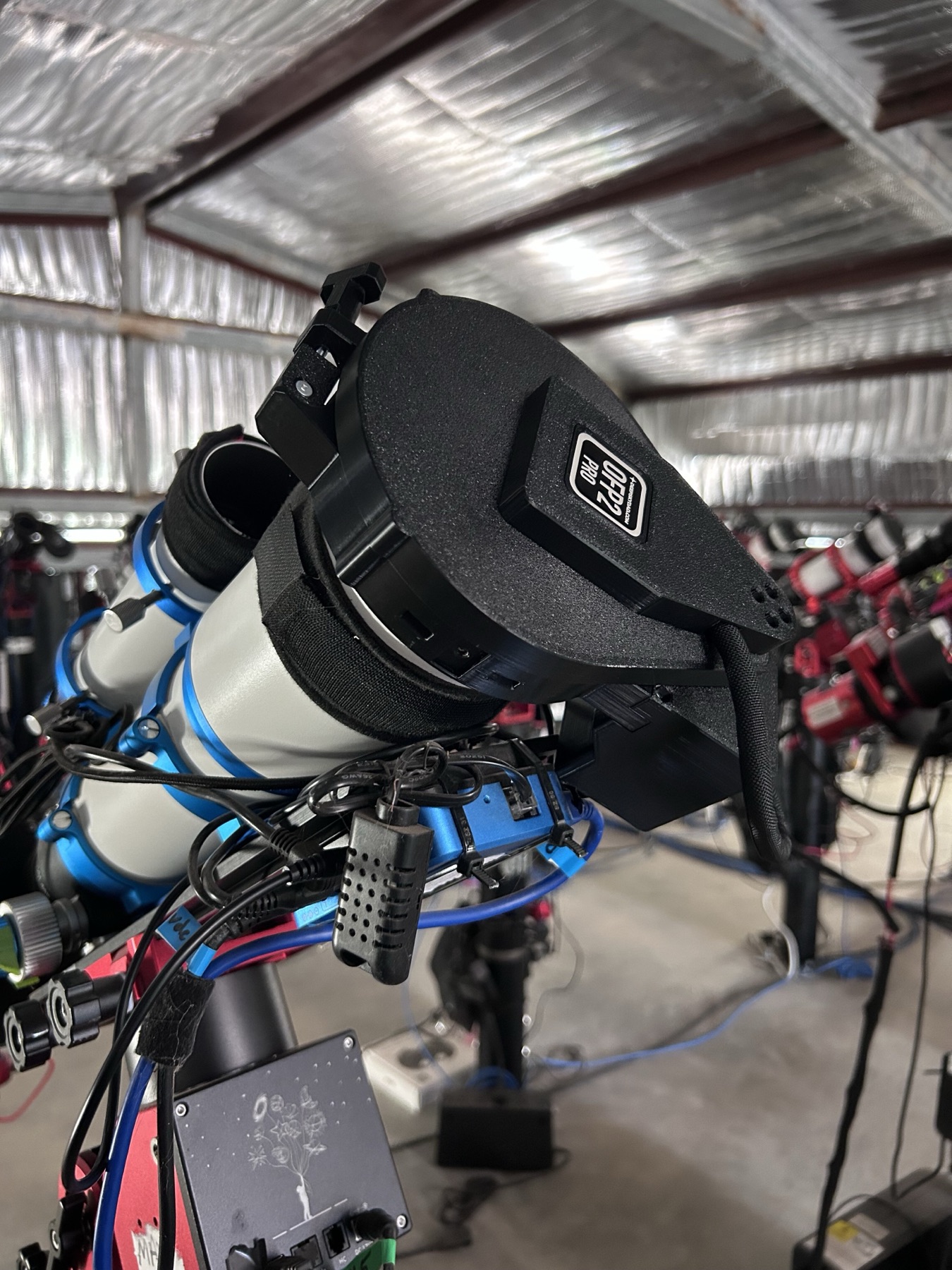
I ordered on 30 July from the Deep Sky Dad web shop – a small manufacturer in Krško, Slovenia. On 10 August the Starfront support team fitted the panel. Eleven days from order to installed hardware, across two continents – the order confirmation had said four to five weeks.
This is the part of remote operation I am still getting used to: I order in Slovenia, it ships to Rockwood, Texas, and it is fitted by people I have never met. To this day I have not had the device in my hands.
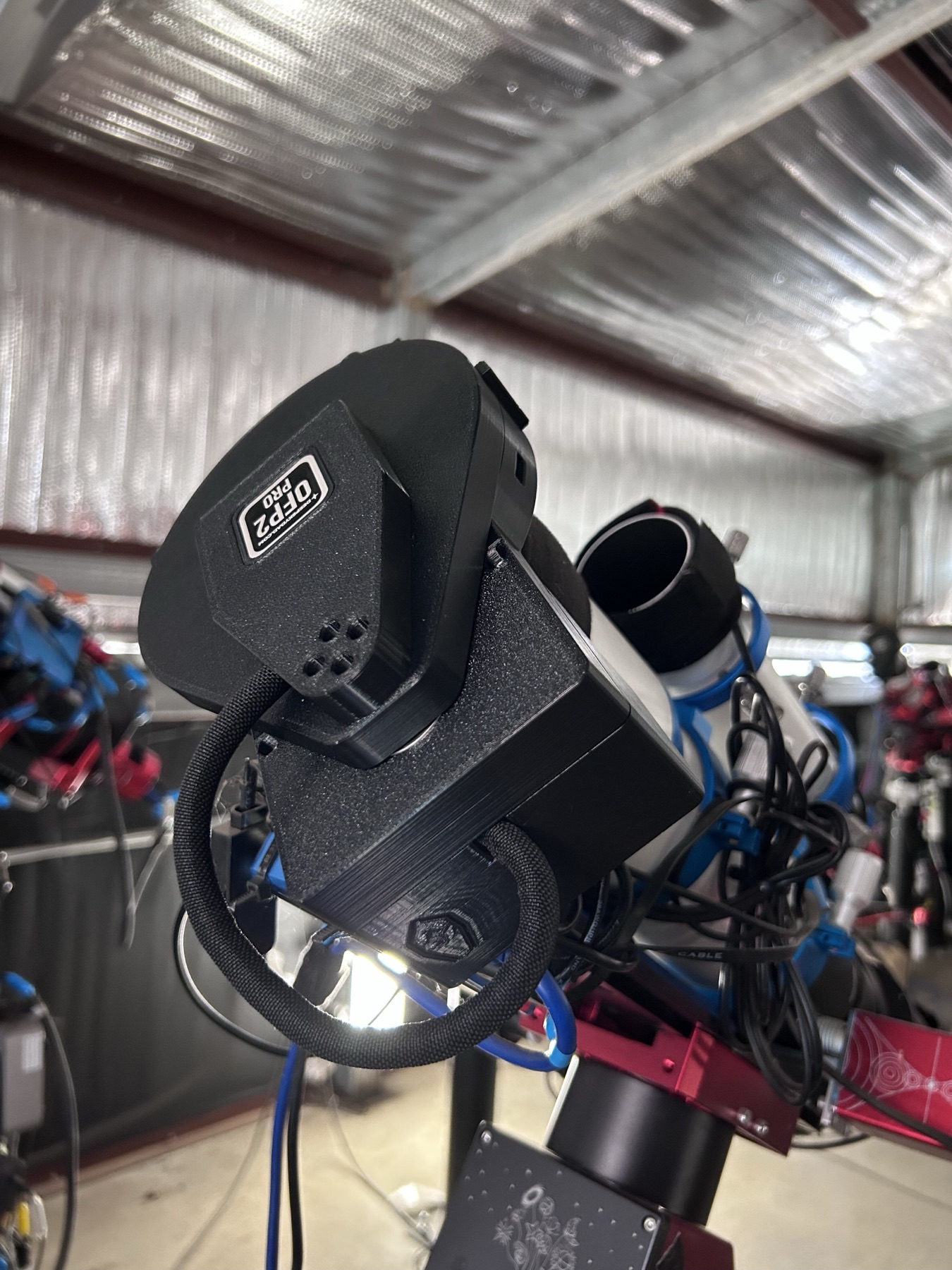
And I commissioned it this morning – which in Texas was still the night of 10 August.
Ten minutes, and it was running
The technician had wired the panel to the Pegasus Pocket Powerbox: power on 12V·3, the USB-C data line on USB3·2. That was the end of his part – everything else ran over Chrome Remote Desktop from the holiday house in Denmark.
Control software and ASCOM driver installed from the manufacturer's site, the panel showed up as COM5, Deep Sky Dad driver selected in N.I.N.A. under Equipment → Flat Panel, connected. Open, close, LED up and down – all of it first time.
After the last few weeks of an AM5 refusing to sync, blocked MPC downloads and a 19-degree miss, that was an unfamiliar experience. A device that you plug in and that then simply does what it is supposed to do.
The technical side of the panel:
| Movement | sideways rather than forwards – no depth needed, no risk of collision in a crowded shed |
| Brightness control | 12 bit, 0–4096 steps |
| Interfaces | ASCOM Cover Calibrator, INDI, ASIAIR |
| Heater | LED heater built in, default “on when the cover is open or the LED is on” |
| Side benefit | closed, it doubles as a dust cover and light block |
| Power | 12 V / 3 A – on my rig PPBA 12V·3 |
| Control | USB-C into the PPBA hub (USB3·2) → appears as COM5 |
| Versions on my unit | firmware 1.0.14 · control panel 1.0.16 · ASCOM driver 1.0.3.6 |
All three downloads sit on the same page at the manufacturer. They do not carry OFP2 in their names – one driver family serves every panel shape, and that is deliberate.
Those 4096 brightness steps look like overkill at first glance, but they are the reason the rest of this article works.
The built-in heater was one of the reasons I bought it
It sits in the table like a footnote, but for me it was one of the arguments for this particular panel. Central Texas is humid subtropical: the dew-prone season runs from late April to mid-October, peaking in July, and the moisture off the Gulf regularly pushes dew points above 18 °C.
The real problem does not arise while the cover is shut, but while it stands open beside the telescope. It hangs in the damp air all night, cools like any other surface, and dew forms on its underside. At the end of the night it closes – and now that wet surface sits a few centimetres above the front lens. From there it drips, at leisure, exactly where you least want it.
That is why the default mode is “on when the cover is open or the LED is on” rather than “only while shooting flats”. The heater keeps the cover dry for as long as it is exposed. Which is precisely how I want it. Anyone running the panel in a dry winter climate could turn it down in the advanced ASCOM settings; here it stays on.
A detail that only appears in the manual
If the 12 V drops out, the servo loses its holding torque. If the cover happens to be open at that moment, it can swing away under its own weight. And that is exactly what I do during remote maintenance: my panel hangs off the Pocket Powerbox, which in turn hangs off a switchable Kasa socket – my most important lever when the rig locks up and I have to cut its power from a distance. So: close the cover first, then pull the socket. Nothing that is printed in bold in the data sheet; it is in the manual, and you only read it once you go looking.
The Flat Wizard has two modes – and the choice is not a matter of taste
N.I.N.A. ships with a Flat Wizard that dials in the right exposure by itself. It can do that in two ways:
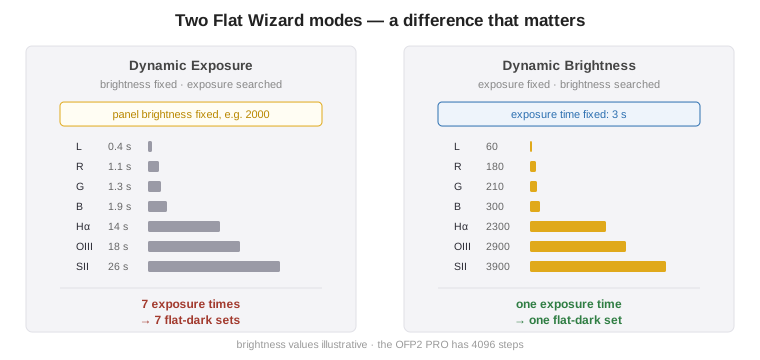
Dynamic Exposure – the panel brightness is fixed and N.I.N.A. searches for the right exposure time per filter.
Dynamic Brightness – the exposure time is fixed and N.I.N.A. searches for the right brightness per filter.
The difference looks academic until you think about the flat-darks.
A short detour: what a flat-dark actually depends on
A flat is not only light. Every frame also carries an electronic pedestal – offset plus read noise – and that has to be subtracted before you divide by the flat. The frame that measures this pedestal is the flat-dark: same camera settings, same exposure time, just without light.
And here is the point I had wrong in my own head at first:
A flat-dark does not depend on the filter. It is taken in the dark – which filter happens to sit in the light path is entirely irrelevant. It depends on exposure time, gain, offset and temperature, and on nothing else.
So the number of series you need turns on one thing only: how many different exposure times the flats have. Not how many filters sit in the wheel.
What that means for seven filters
With Dynamic Exposure the panel brightness is fixed, so the exposure time has to absorb the difference between the filters. Luminance lets almost everything through and is bright enough after a fraction of a second; a 4.5 nm narrowband filter needs many times that. The result is seven different times in the table – and a 0.4-second flat-dark cannot calibrate a 26-second flat, because the pedestal is entirely different. Each of those seven times therefore needs its own series: seven flat-dark series of twenty frames each, seven folders, seven opportunities to mix something up while stacking.
With Dynamic Brightness the time is the same for all seven filters. They differ only in panel brightness – and the flat-dark does not care about that, because it is taken in the dark. One series calibrates all seven filter sets.
That is why I settled on Dynamic Brightness. Not because the flats come out better – they are equivalent either way – but because seven calibration series become one. On a rig where I cannot fix anything by hand if something fails to line up during stacking, that counts for more than any theoretical nicety. And there is a second benefit: a fixed time is a time I choose myself – I can set it safely clear of the banding threshold the next section is about. With Dynamic Exposure the wizard picks it, and for luminance it may well land at 0.4 seconds.
None of this is possible unless the panel can be dimmed that finely. Between luminance and a narrowband filter lie two orders of magnitude in transmitted light. A panel with eight brightness steps could not cover that range at a fixed exposure time. One with 4096 can.
Why the exposure time must not be short
My first choice was a fixed time of five seconds. That sounds like a lot for a flat – with an f/4.7 system and a bright panel you could work with a tenth of a second. But you should not.
The reason lies in how an LED is dimmed.
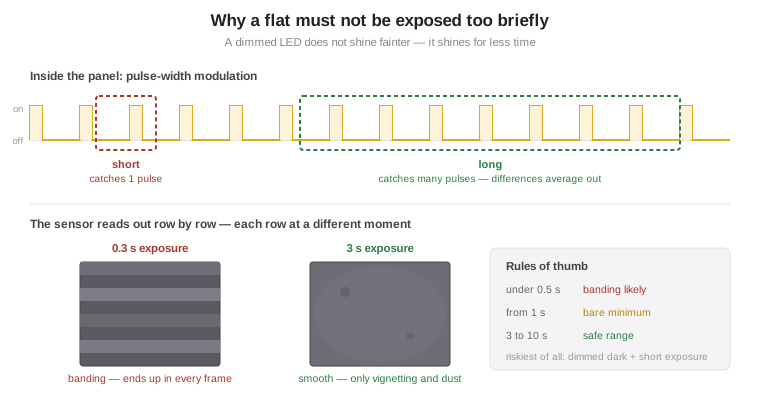
An LED is hard to adjust in brightness but easy to adjust in timing. So the panel switches it on and off rapidly; the ratio of on to off sets the perceived brightness. That is pulse-width modulation.
The sensor in the Ares-M Pro is a rolling-shutter sensor: it reads the rows one after another, each at a slightly different moment. Expose for a long time and the pulses average out equally across every row. Expose briefly and one row catches three pulses while the next catches four – and the flat comes out with banding. Which then travels through calibration into every single frame.
The rules of thumb from forums and from the panel manufacturers are unambiguous: below half a second it gets risky, from one second you are at the bare minimum, and between three and ten seconds you are safe.
The first correction: five seconds was too much
The wizard taught me that lesson itself. Running through all the filters, it aborted on luminance with an error: too bright. Even at the darkest panel setting, too much light came through the L filter in five seconds.
So down to three seconds. That did it.
Three seconds is still inside the safe corridor – at the lower end, but inside. The one place I will still look at closely is, of all things, the L flat: a panel dimmed dark and a short exposure is the worst conceivable combination for banding. One L flat stretched hard, and the question is answered.
The ADU target and a trap at 14 bit
A flat should be neither too dark nor too bright. Too dark means a poor signal-to-noise ratio; too bright means drifting into the non-linear region just short of saturation. The usual target lies between a third and a half of the value range; I set 40 per cent, with a tolerance of 20 per cent.
Except: what is 40 per cent?
The Ares-M Pro has a 14-bit converter. Natively it delivers 0 to 16,383, not 0 to 65,535. Whether the driver scales those values up to 16 bit or drops them unscaled into a 16-bit container decides which absolute number sits behind that 40 per cent:
| Data as delivered | 40 % means |
|---|---|
| scaled to 16 bit | 26,214 ADU |
| unscaled, 14 bit | 6,553 ADU |
Two minutes settle it: take a deliberately overexposed test frame and see where the maximum value tops out. At ~16,383 the data is unscaled, at ~65,535 it is scaled. N.I.N.A. shows the corresponding ADU value next to the percentage slider anyway – compare that with the test frame.
How many flats? The answer depends on how deep you go
This is where it got interesting for me, because I had simply taken the number on trust. “Twenty to thirty flats” is what you read everywhere. But why?
The reason is easy to overlook: the noise of the master flat does not average away when you stack. The lights do – the more of them, the smoother. But every light is divided by the same master flat, so its noise pattern is written identically into all of them. It stays there as a floor, however many hours you pile on.
Which means: the deeper the total integration, the better the flat has to be.
Let us work it through for my camera. From the manual: 73,000 e⁻ full well at gain 0, 14-bit ADC, HCG kicks in at gain 125 – exactly the gain I run. That works out to 1.06 e⁻/ADU and around 17,300 e⁻ saturation.
Update, 17 August 2026: Both of these values are derived from the manufacturer's figure. Measured, they are 1.04 e⁻/ADU and 17,040 e⁻ – about two per cent below my calculation. Every percentage below therefore shifts in the decimals; none of the conclusions change. The 1.5 e⁻ of read noise assumed further down, by contrast, is close: 1.395 e⁻ as measured. The optimal sub length →
| Flat at 40 % | 6,553 ADU = 6,924 e⁻ |
| Photon noise of a single flat | 83 e⁻ = 1.20 % |
| Master from N flats | 1.20 % / √N |
On the other side of the ledger is the sky background. In the L filter, at SQM 21.9, with 81 mm of aperture and 2.03 ″/px, roughly 0.8 e⁻ per pixel per second arrive – 48 electrons in a 60-second frame.
Update, 17 August 2026: Those 0.8 e⁻/px/s were an estimate. Measured, it is 0.68 in the luminance filter – fifteen per cent off, for a number derived from an SQM reading and an aperture. And the factor of 70 to narrowband holds: 68 as measured. The same measurement also allows the sky itself to be worked backwards: about SQM 21.9, that is Bortle 2 – so the 21.9 assumed here was a good guess, even though it was only a pick from the published range of 21–22. The optimal sub length →
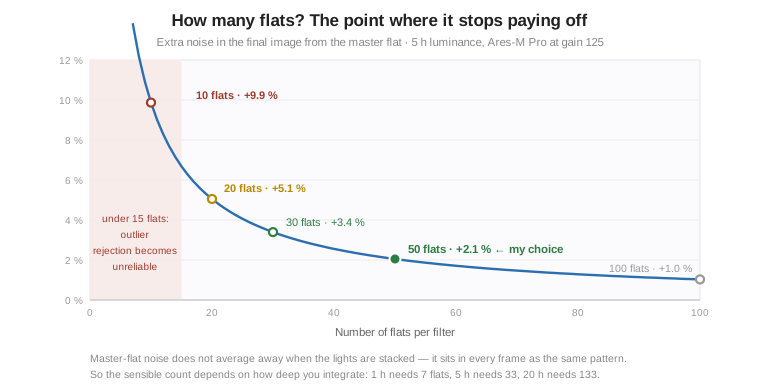
The knee sits visibly between 15 and 30. And there is a second, independent lower bound: sigma clipping needs frames before it can estimate a reliable spread at all. Below ten to fifteen, outlier rejection becomes unreliable – it either finds nothing or throws away good data.
An objection: dithering
That curve is an upper bound. It assumes the flat error sits at the same place on the sky in every light – which only holds if the camera stays still between frames.
But I dither every sub, by roughly ten pixels on the main camera. The flat error is stuck to the sensor pixels while the target moves: over the course of the night the same point on the sky lands on many different sensor pixels, and registration brings them all back on top of one another. So the pixel-to-pixel part of the flat noise averages down exactly like photon noise – over 300 subs by a factor of √300, seventeen-fold. This is precisely what dithering and drizzle exploit in professional astronomy.
What the dither does not average away is the large-scale part: the vignetting profile, the edge of a dust shadow, an illumination gradient across the panel. Those errors are effectively constant over ten pixels – and they are not shot-noise limited either, so the curve above does not describe them in the first place.
The real requirement therefore lies somewhere between the curve and almost nothing, depending on how far you dither and how evenly the panel illuminates the field. The lower bound from sigma clipping is untouched by any of this – and it asks for fifteen frames regardless.
I went with 50 flats per filter. Thirty would have been enough for most of my projects – at five hours of luminance that is 3.4 per cent extra noise against 2.1 at fifty. But the extra twenty frames are so cheap that the question barely arises.
Because here remote operation helps twice over. Flats are taken outside the hours of darkness and cost not a single minute of imaging. And because nobody touches the tube on my rig – no setting up and tearing down, no rotated camera, no swapped adapter – today's dust shadow will still be in the same place in four weeks. So the set lasts a long time.
Fifty flats at three seconds, download time included, come to a good four minutes per filter, or just under half an hour for all seven. Once, and then valid for weeks. Given that arithmetic, skimping on twenty frames would be absurd.
Update, 13 August 2026: “Once, and then valid for weeks” has been overtaken. Since the flat handling in Astro PM took over the process, the rig takes the flats afresh at the end of every night – and for exactly the filters that were actually exposed that night. The effort per session goes up; in exchange, the question of whether a set from three weeks ago still fits disappears.
Flat-darks: fewer will do here, and by a wide margin
For the flat-darks the same arithmetic leads to a completely different answer.
A flat-dark at three seconds and −10 °C contains virtually no dark signal. The manual quotes 0.000996 e⁻/px/s at 0 °C and 0.000044 at −20 °C; at −10 °C that comes to around 0.0006 electrons in three seconds. So on this camera a flat-dark is effectively a bias: offset plus about 1.5 e⁻ of read noise.
And 1.5 electrons are meaningless against the flat's 83 electrons of photon noise. Even five flat-darks would degrade the master flat by only 0.16 per cent, and ten by 0.08 per cent. So ten would be more than enough on paper.
I took fifty anyway – the same number as the flats. Not because the arithmetic demands it, but for two other reasons: here too I want outlier rejection to rest on a solid statistic. And fifty times three seconds is two and a half minutes. At that price, thinking about the right number takes longer than shooting them.
The difference from the flats is still worth knowing: with the flats you need the quantity, with the flat-darks you get it for free. If you are short of time, cut here and not there.
For narrowband all of this holds with far more room to spare. My 4.5 nm filters pass roughly seventy times less sky light than luminance; the image noise is correspondingly higher, and the flat noise barely registers against it. The same thirty flats are generous for SII – it is always the broadband channel that is demanding.
What the panel changes in the power budget
There was one consequence I had not reckoned with, and it has nothing to do with optics.
Flats are taken while the camera cooling is still running. Until now the peak load on my Pegasus supply was around 5 of 10 amps – camera, focuser, filter wheel, guider, two dew heaters. The panel is rated at 12 V / 3 A, and the servo briefly draws a decent amount when it opens and closes.
That puts roughly 8 of 10 amps on the line at the worst moment. It is within spec, but the comfortable margin I had is gone.
Two caveats, so the number does not look bigger than it is. The 3 A is the manufacturer's power-supply recommendation, not a measured current – it covers the case of a stalled motor. And the cover moves only twice a night. What I will do on the next automated run is watch the Pocket Powerbox's power readout. Then I will have the real figure instead of an upper bound from a data sheet.
The catch that ambushes you from 8,500 km away
And then there is one more thing in the way that has nothing to do with optics.
The Flat Wizard blocks before the flat-darks with a dialogue box – “please cover the light source” – and waits for a click. For a machine in Texas that means the run stops until I log in over remote desktop. It will not go through unattended.
The way out is trained flats. Once the wizard has run through, it writes the values it found into a table – per filter and gain: exposure time and panel brightness. That table can be used in the Advanced Sequencer through the Trained Flat Exposure and Trained Dark Exposure instructions. They ask nothing; they take the stored values and start exposing.
So the process has two stages: train once by hand, watching the screen. Automated from then on at the end of the nightly sequence – close the panel, LED on, flats, LED off, flat-darks, panel shut.
Still to do
Building it into the sequence. So far I have trained by hand and triggered by hand. The flat block still has to go at the end of the night so that it runs through without me.
The real darks. The Flat Wizard does not do those – they need a series of their own per exposure time, in the dark, with the roof closed. That the panel doubles as a light block when shut helps here.
In the end what is remarkable about this device is how unspectacular it was. A lid that slides aside and lights up, for a few hundred euros. The actual work was not in the panel but in the numbers behind it – and those, as has become my habit, I worked through together with Claude AI.
Sources
Deep Sky Dad – Flat Panel 2 PRO manual (PDF) · software and drivers
N.I.N.A. – Flat Wizard
Player One – Ares-M Pro manual (PDF) – full well, dark current, read noise
Pegasus Astro – Flat Calibration Frames Howto
Cloudy Nights – Darks and Flat Darks in regards to N.I.N.A.’s changed Flat Wizard
🔭 Why I needed the panel: Flats, darks, bias – calibration → · The rig behind it: My rig @ Starfront in Texas · The filters in the wheel: Mono camera, filter wheel and my filters