 Svenesis.org
11 August 2026 · 🔭 Astronomy
Five minutes to an answer, one night to a feature – my start with Astro PM
I have recently been working my way into N.I.N.A.'s Advanced Sequencer. It can do a great deal, and that is exactly the problem: you assemble a night container by container, and at the next change of target you rebuild it all over again. For a rig 8,500 kilometres away, every change means a remote desktop session.
While reading up on it I came across Astro PM. The concept caught my interest immediately – for a reason that at first has nothing to do with astronomy.
What it actually is
The application itself takes no images. It is a planning workbench for the desk – and it covers a good deal of what otherwise ends up spread across spreadsheets, planetarium software and three more tools:
Equipment
as structured data: telescopes, cameras, filters, sites. Swap the telescope in a project and the field of view, image scale and SNR model follow immediately.
Projects with a life cycle
Every target runs through Planning → Active → Processing → Complete, with an exposure plan per filter and a progress bar against the target figures.
Sky View
A planetarium view onto your own coordinates: the altitude of each target through the night, when it crosses the meridian, how the field of view sits, where the tiles of a mosaic fall.
Calculators
that already know your own gear – sampling, focal length, exposure, drizzle, binning.
SubInspector and image analysis
HFR, FWHM, eccentricity and star count plotted across a whole night, rejects moved into a separate folder with a click. Plus single-frame analysis with tilt, field curvature, vignetting and a 3D PSF.
Weather and image synchronisation
from the remote rig to your own machine.
The full list is on astro-pm.com. What appealed to me, though, is not in the modules but in the chain behind them.
The active projects are pushed to a cloud at the press of a button. On the machine at the telescope sits a plugin for N.I.N.A. 3.x that fetches those targets from there, works out the schedule for the night from them – by altitude, moon and remaining exposures – and then executes it. Slew, centre, filter change, dither, target change.
The point where it clicked for me:
The sequence file no longer contains any targets.
It becomes a scaffold you build once and then leave alone – in my case: connect the equipment, cool the camera, flat panel cover open at the start; Find Home, warm up, cover shut, disconnect at the end. In between, a container that says: run whatever is due tonight. If I want a different target tomorrow, I change that at my desk, not at the rig.
For anyone who has to make every sequence change through a remote session, that is a different way of living with the setup.
A Windows application, and all I have is a Mac
And then came the let-down. Astro PM is a Windows-only application – Windows 10 or 11, 64 bit. For some time now I have worked exclusively on a MacBook Air M4. The Windows machine I own is in Texas.
That nearly settled the matter. It did not, though, for two reasons that fit together nicely:
1 · VMware Fusion is free these days
Broadcom made it free in November 2024, for personal and commercial use alike, with no licence key. All you need is a Broadcom portal account for the download.
2 · Astro PM ships natively for ARM64
An M4 is an ARM processor, and a hypervisor cannot virtualise a foreign instruction set architecture – it passes instructions through to the CPU rather than translating them. On Apple silicon, then, only Windows 11 for ARM can be virtualised. And that is exactly what the ARM64 build expects: a Windows-on-ARM device. No emulation layer in between.
That Astro PM ships in two native builds, x64 and ARM64, is convenience rather than a requirement: Windows on ARM brings its own x64 emulation, so the ordinary Windows build would run through that too. It simply is not necessary.
The result is a Windows application that runs on a Mac as though nothing were unusual. I had reckoned with noticeable compromises; in daily use I have not hit one yet.
Five minutes to an answer
Then came the point where I had actually expected trouble.
I have set N.I.N.A. to write FITS with CFITSIO RICE compression – file extension .fits.fz. It is lossless and packs integer image data about 30 per cent better than GZIP, two to three times faster when compressing; on decompression there is nothing between them. How much it gains in the end depends on the noise in the frame – lossless compression can only compress what is not noise. Given the volumes that pile up over a night and that I then download from Texas, it is hardly a detail.
I do not have much choice in the matter. ASTAP does not read GZIP-compressed FITS at all – and it has only read RICE .fz since version 2026.07.16. That leaves uncompressed or RICE, and uncompressed means twice the data over a long-distance line. So RICE is less a preference than the result of a process of elimination.
When I first started playing with it, it turned out that Astro PM could not read these files. So I put the question to the Astro PM Discord server.
After five minutes the answer came: no problem adding that – did I have sample files? I did. The next morning the update was there, feature included.
That is how it should be. I am used to large vendors, where a question like that becomes a ticket, a case number and, at best, an entry on a roadmap. Here somebody sat in their own Discord and simply built it.
Worth adding: I am still in trial mode. The licence costs 49 US dollars a year, all modules included, cancellable at any time – it then keeps running to the end of the paid period.
Rebuilding the sequence
The Astro PM website offers ready-made sequence templates for download, which you read into N.I.N.A. through Import. I started from “Single Night — with Safety” and made my own version of it.
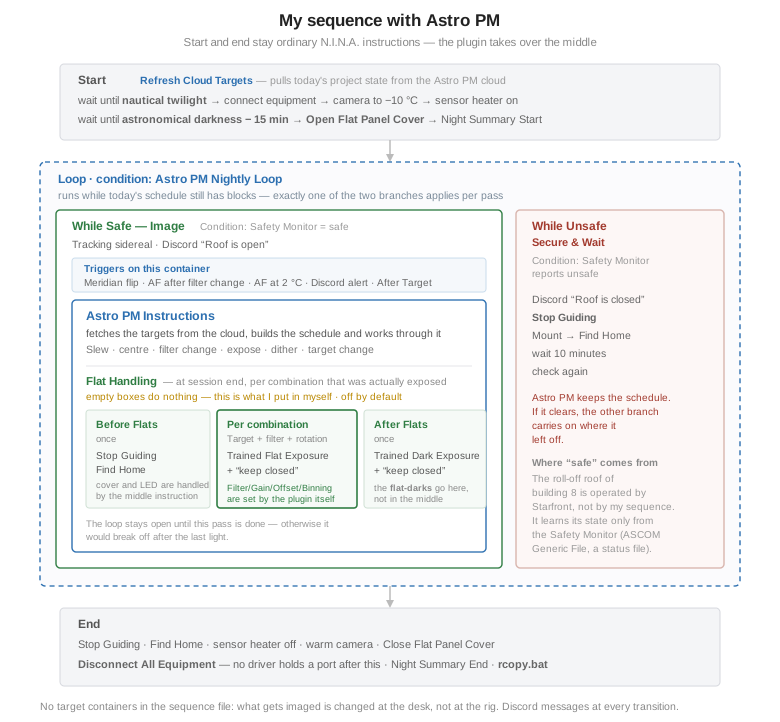
The start block opens with the only Astro PM instruction outside the night section: Refresh Cloud Targets. It pulls the current state of my active projects from the cloud down to the machine in Texas – so whatever I changed at my desk during the day becomes the basis for the coming night. Without that step the sequence would run on yesterday's state.
The rest is in two stages: wait until nautical twilight, then connect the equipment, cool the camera to −10 °C over five minutes, sensor heater on – the dew heaters run independently of this through Auto-Dew in the Pocket Powerbox. Then a second wait until fifteen minutes before astronomical darkness – only then does the cover of the flat panel open.
What stands out here once you look for it: there is no instruction that opens the roof. The Open Flat Panel Cover in the start block is the flat panel's cover, not the building.
The roof is not mine
My rig sits in building 8, under a roll-off roof shared by every pier inside it. It is operated by the site – according to weather, time and operational decisions. I have no access to it and do not want any.
What I do have is information: the safety monitor, in my case the ASCOM driver Generic File. It reads a status file on the rig machine and turns it into a plain safe or unsafe. That inverts the logic: the sequence does not control the roof, it reacts to it. Which is why the night section has two branches, and the safety monitor decides on every pass which one runs:
While Safe — Image
tracking to sidereal, then Astro PM Instructions takes over.
While Unsafe — Secure & Wait
message to Discord, stop guiding, mount to Find Home, wait ten minutes, check again.
That answers the question I had asked myself beforehand: what happens if the roof never opens at all? Then the night loops through the unsafe branch, the rig sits safe, and Astro PM keeps its schedule. If it clears at three in the morning, the loop switches back and picks up the exposures where it left off.
The triggers hang on the “While Safe” container, not on the Astro PM instruction. In my case those are meridian flip, autofocus after filter change, autofocus on a 2 °C temperature change, a Discord alert on errors, and Astro PM's own After Target trigger. This was where I was most sceptical: a plugin that takes over the whole night could easily disable the mechanisms I rely on – the meridian flip above all, which has cost me two frames once already. It does not: Astro PM evaluates the triggers between its own exposures, exactly as N.I.N.A. would.
The closing block is ordinary N.I.N.A. again: Stop Guiding, Find Home, sensor heater off, warm the camera, Close Flat Panel Cover. The mount goes home first on purpose – warming up takes five minutes, and the tube should not stand open that long. That the flat run has already done the first two steps does not matter: the closing block runs even when the flats did not, which makes it the last resort rather than the normal path. Above all the cover has to be shut before the power goes off at some point – otherwise the servo loses its holding torque.
Then Disconnect All Equipment, after which no driver is still holding a COM port or a USB handle. That is the whole point: when I pull the Kasa socket in the morning, I am not tearing down an open connection. Finally two things that were not in the template – the night summary from the Night Summary plugin and an external script, rcopy.bat, that copies the night's images away.
And spread across the whole sequence hang Discord messages: start, twilight, equipment connected, roof open, roof closed, finished, copy run started and ended. Plus an error alert in three containers. From 8,500 kilometres away that is my window into the night – and a message that does not arrive says just as much as one that does.
One setting matters more than it looks: the playback mode. Time-Aware – the default – means that after a delay the sequence jumps to where it ought to be according to the clock. A forty-minute safety shutdown therefore costs those exposures, but the rest of the night stays on plan and the filters still line up with the planned moon windows. Sequential works the list strictly in order and then simply runs late; the block boundary is hard in both modes, though, so here too it is cut off rather than allowed to run into the next target window. For a remote rig where clouds and roof closures come with the territory, I am staying with Time-Aware.
Update, 13 August 2026: That no longer holds in such general terms. On the first automatic night Time-Aware threw away a whole channel to stay on schedule, with only five exposures planned. For long nights it remains the right choice; for short blocks I now run Sequential. What happened on the first night →
So where do the flats come from now?
While rebuilding, I reached the place where I had pictured the flat block. I had planned it in the closing block, right after warming the camera – the obvious spot coming out of the flat panel article. Even the comment in the template suggests exactly that.
Wrong call. Astro PM brings something of its own for this, and the logic behind it is better than mine.
It does not plan the flats, it remembers them. Every successfully exposed light writes its combination of target, filter, rotation angle, gain, offset and binning into a list. That list is de-duplicated and written to disk; it even survives a N.I.N.A. restart in the middle of the night. At the end of the session it is precisely this list that gets worked through – not the planned one, the one that actually ran. Anything that fell through because of cloud gets no flat.
What is recorded is the mechanical rotation angle, not the one on the sky – once the telescope is parked, the latter says nothing any more. When working through the list, Astro PM groups by rotation and drives the rotator back to exactly that value once per group. On my rig this comes to nothing, as I have no rotator; anyone who does gets their dust shadows back in the same place.
That is what the Flat Handling section at the bottom of the Astro PM container is for, with three boxes:
Before Flats
runs once
For Each Target + Filter + Rotation
runs per combination
After Flats
runs once
The middle box is the core. Astro PM writes the filter, gain, offset and binning of each combination straight into the instruction before executing it. The lookup in the trained-flat table therefore cannot miss the values that were used for imaging that same night – without me setting anything per filter. Astro PM also handles the filter change and driving to the rotation angle itself, outside the boxes.
What belongs in the boxes – and what happens if they stay empty?
This is where I got stuck, because the documentation describes the boxes but does not say how much you have to put in yourself. The answer, after reading both pages:
The boxes are places to put your own N.I.N.A. instructions. If one stays empty, nothing happens there. So Astro PM does not park anything of its own accord, closes no cover and switches on no LED. It runs what is in there, and nothing else. Only the middle box comes pre-filled, with a Trained Flat Exposure set to twenty frames; and Astro PM's troubleshooting page, under “Flats Did Not Run”, asks about that one box only.
And then comes the twist that saved me the work. The Astro PM documentation suggests “park mount, close cover, LED on” for Before Flats and “LED off, cover open” for After Flats. That is the order you need when working with ordinary exposure instructions. With trained flats you do not need it. The N.I.N.A. instruction Trained Flat Exposure does all of that itself: it looks up the values, closes the cover, sets the brightness, switches the light on, exposes, switches the light off again and opens the cover at the end – the last of those only if keep closed is not set. Its counterpart Trained Dark Exposure behaves the same way, it just leaves the light off.
Which leaves me with this:
| Before Flats | Stop Guiding, then Find Home – the mount into a defined position. Not Park Scope: on firmware 1.8.8 the AM5 parks horizontally. |
| Per combination | Trained Flat Exposure, set to 50 on my rig, with “keep closed” ticked – otherwise the cover opens and shuts once for each of the seven filters without achieving anything. |
| After Flats | Trained Dark Exposure for the flat-darks, also 50 and also with “keep closed”. Nothing after that – the closing block of the sequence shuts the cover anyway. |
The flat-darks in After Flats are my own conclusion; they appear nowhere in the documentation. The reasoning: a flat-dark does not depend on the filter, only on exposure time, gain, offset and temperature. In the middle box it would come up again with every single combination – seven filters, seven identical series. As a single run in After Flats, one series covers everything.
That only works under one condition, and in my case it happens to be met: Trained Dark Exposure also pulls its exposure time from the table per filter, and Astro PM writes nothing into the instruction outside the middle box. A single run therefore covers all filters only because I settled on Dynamic Brightness in the Flat Wizard – one fixed exposure time for all seven. Anyone working with Dynamic Exposure cannot do it this way.
Update, 13 August 2026: The clause “Astro PM writes nothing into the instruction outside the middle box” is wrong. It fills in the Trained Dark Flat Exposure itself as well, with filter, gain, offset and binning. And placing it in After Flats turned out to be a mistake: there the instruction sat outside the loop and failed on the first night with a NullReferenceException. Since it has been inside the loop, the flat-darks appear by themselves. The first night → · The second night →
Two more things to know. The feature is off by default and wants switching on through Enable Flats Sequence – the setting appears in three places, and the one that counts is in the desktop simulator, which syncs per rig through the cloud. And the flats land under the name of the target they belong to; with the usual N.I.N.A. file pattern that means: in the FLAT subfolder next to the lights they calibrate.
The dialogue box where the Flat Wizard stops before the flat-darks and waits for a click drops out entirely – neither trained instruction asks anything.
A small detail that shows how well thought through this is: the loop condition Astro PM Nightly Loop holds the container open until the flats at the end of the night are finished. Otherwise the loop would break off after the last light and take the flat run with it.
This does shift one piece of arithmetic I set out in the flat panel article, though. There I had thought of fifty flats per filter as a set that lasts for weeks. Astro PM instead takes them fresh every night, matched to that particular night. The effort per session goes up – in exchange, the question of whether the set from three weeks ago still fits today's state disappears. I have stayed with fifty for now; whether that makes sense in the long run remains to be seen, since whatever accumulates over several nights on the same target ends up stacked together anyway.
Still to do
Sources
Astro PM · N.I.N.A. integration · documentation
Astro PM – Building Your Sequence · Playback Modes · Automated Flat Handling
Astro PM – System Requirements & Download – Windows 10/11, x64 and ARM64 builds
VMware Fusion and Workstation – free since the Broadcom acquisition
Microsoft – How emulation works on Arm – x86/x64 emulation under Windows on ARM
Fpack and Funpack User’s Guide – RICE compression for FITS
ASTAP – reads .fits.fz with RICE from version 2026.07.16, GZIP not at all
🔭 The panel the flat handling is about: A lid that lights up → · The rig behind it: My rig @ Starfront in Texas · The trigger that matters most to me: meridian flip