 Svenesis.org
12 August 2026 · 🔭 Astronomy
The first session with Astro PM – and the three things that went wrong
Yesterday I wrote up how I rebuilt my N.I.N.A. sequence around Astro PM – including the three filled boxes for automatic flat handling. On the night of 11 to 12 August the whole thing ran through without me for the first time.
This is what was on the disk in the morning:
4
lights
150
flats
0
flat-darks
The log of that night is what I actually got out of it. It brought three things to light that I had either assumed wrongly or not considered at all.
First, the planning in Astro PM
The night does not start in Texas but in Astro PM on the MacBook. A project for M33, status Active, plus an exposure plan per filter. That is all it takes – the Nightly Simulator does the rest: pick a date, hit Simulate, and you get the night before it happens.
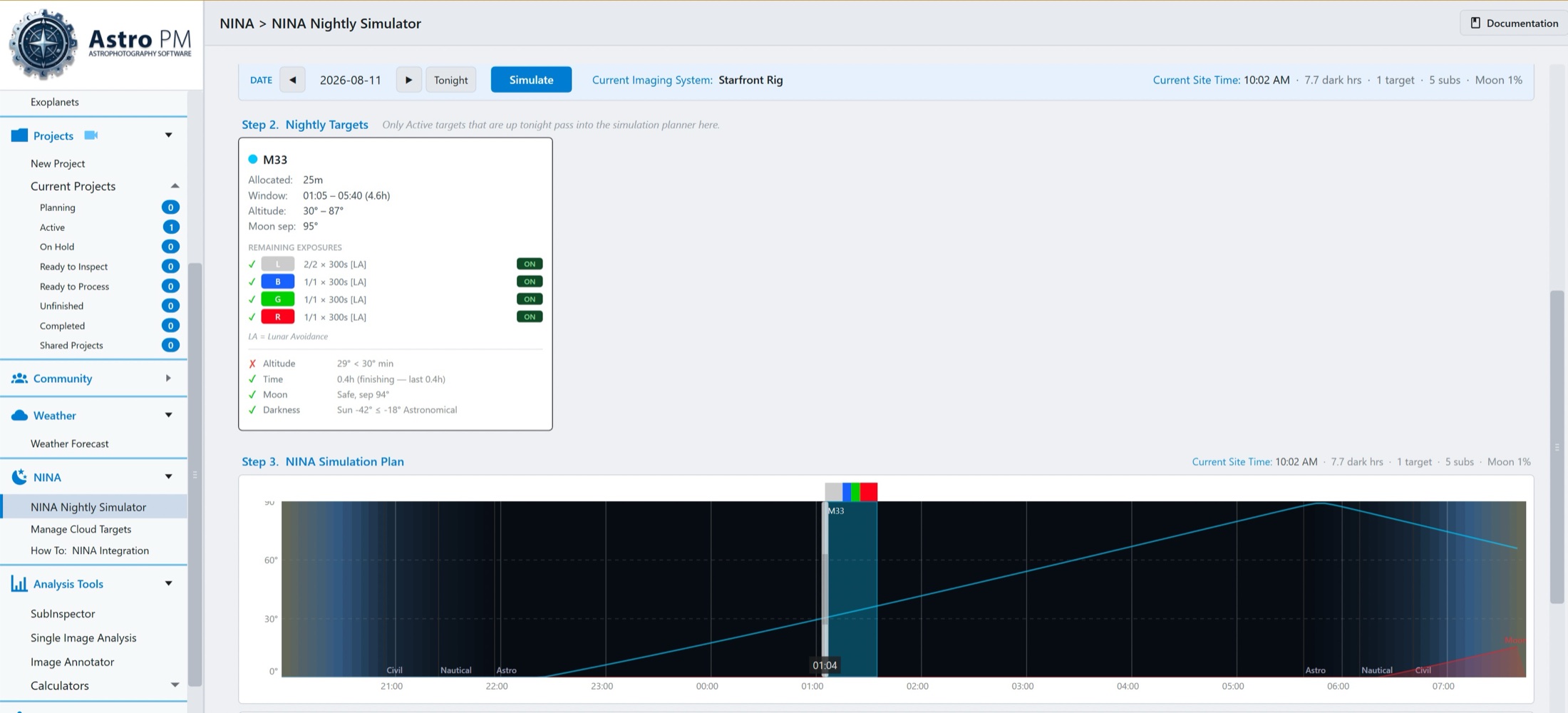
The target card answers the questions I would otherwise estimate by hand:
| Window | 01:05 – 05:40, so 4.6 hours |
| Altitude | 30° to 87°, minimum 30° |
| Moon separation | 95° at 1 % moon phase |
| Allocated | 25 minutes = 5 × 300 s |
| Filters | L 2 × 300 s · B, G, R 1 × 300 s each, all with lunar avoidance |
Below that the go/no-go checks. Time, moon and darkness are green, altitude is red – 29° against a minimum of 30°. That is not a problem but the reason for the late window: M33 was still too low at the moment of the simulation, and Astro PM works out from that when it will no longer be too low.
That same 01:05 turns up again later in the rig's log. The schedule the plugin builds at night in Texas is the one the simulator showed at my desk that morning – same engine, same rules. I did not have to open N.I.N.A. once for it.
The bar at the bottom of the night graph shows it visually: a narrow column at 01:04, colour-coded by filter along its top – grey, blue, green, red. Five exposures in a night with 7.7 dark hours. That is not much, and it is deliberate: I wanted a test run, not a night's worth of data.
Finding 1: one wrong default – and the camera ran at two gains
When setting up the Ares-M Pro under Equipment → Camera, I had entered gain 150 at offset 50 as the default. My N.I.N.A. profile, though, has always been on gain 125 – the point at which the high conversion gain stage opens on this sensor, and the reason I settled on that value in the first place.
Two numbers, two programs, one camera. The result of this night, counted from the log:
| Exposure | Triggered by | Gain |
|---|---|---|
| 4 × 300 s light | Astro PM | 150 |
| 150 × 3 s flat | Astro PM | 150 |
| 3 × 2 s plate solving | N.I.N.A. itself | 125 |
| 35 × 4 s autofocus | N.I.N.A. itself | 125 |
The dividing line runs exactly where you would expect it, once you have seen it:
Whatever Astro PM initiates gets the value from the cloud. Whatever N.I.N.A. exposes for its own purposes takes the profile value.
So within a single night the same camera ran at two different gains. That is harmless for plate solving and autofocus – both only care whether there are enough stars in the frame. For everything else it is not:
The lights are gain 150
All my documentation, every calculation of full well, e⁻/ADU and saturation, and every dark library I have built so far assume 125. None of it fits these four frames.
The flats are gain 150 too
And this is the part that worked. Astro PM writes the gain of the lights into the flat instruction, so flat and light match each other. Just not the rest of my archive.
The trained values come from the 125 world
The Flat Wizard dialled in brightness and time per filter at gain 125. That night the same values were applied at 150 – same light, same time, more amplification. So the flats came out brighter than I had set them.
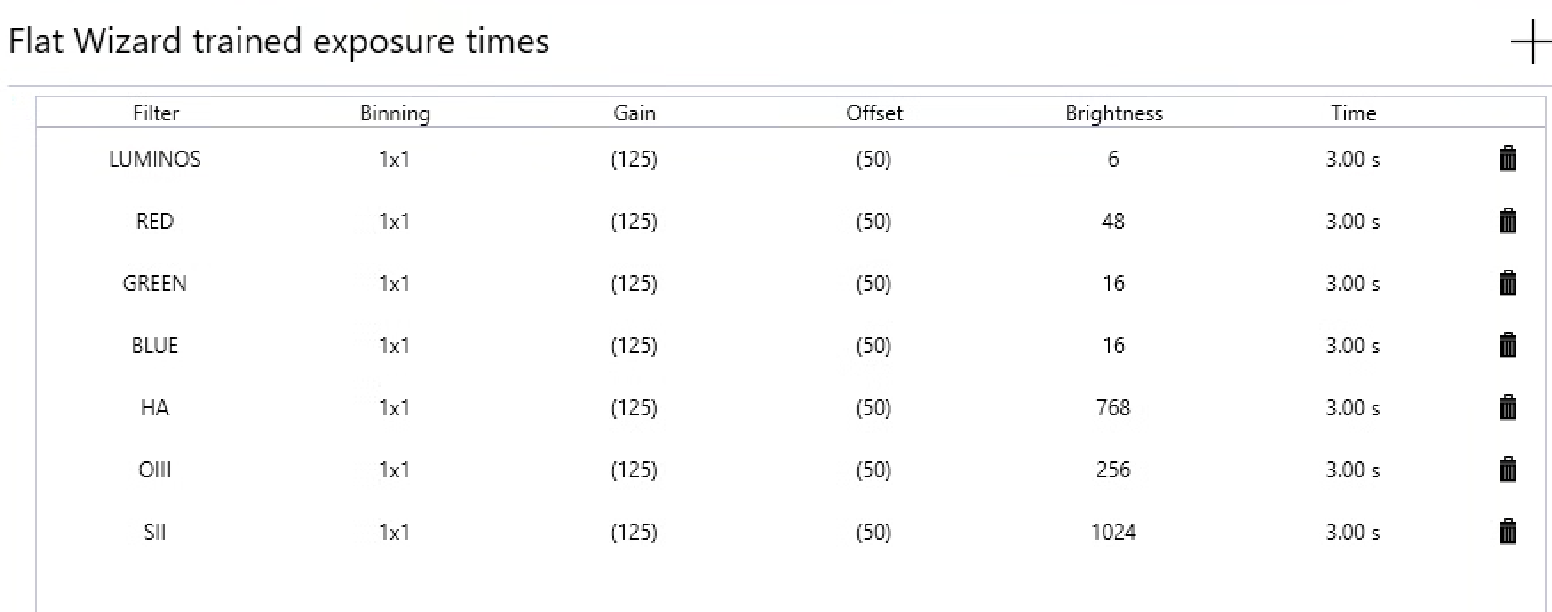
Those brackets are why everything ran anyway: the entries are not tied to a particular gain, they are found even when an instruction asks for 150. The log proves it – the brightness values applied were exactly the ones in this table: 6 for luminance, 16 for blue, 48 for red. They simply no longer match the ADU target they were once found for.
In passing, the table answers a question left open in the flat panel article: whether any filter sits against one of the two end stops. At the top there is plenty of room – SII needs 1024 out of 4096, a quarter of the range. At the bottom it gets tight: luminance is at 6, and there is not much below that. Between the brightest and the darkest filter lies a factor of 170, and both fit into the same three seconds. That is exactly what the 12 bits of brightness resolution are for.
What ran through
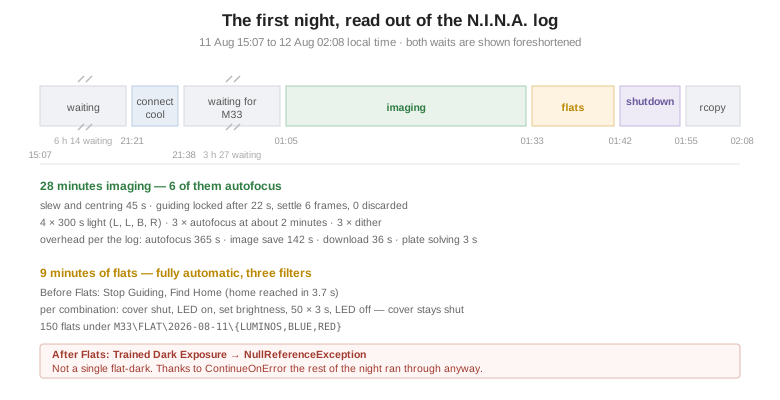
Started at 15:07, then six hours of waiting until nautical twilight, then connecting and cooling – and at 21:38 the panel cover opened. At the same moment Astro PM built the schedule:
AstroPM | Fetched 1 targets from cloud
AstroPM | Target: M33 loc=Starfront scope=GT81 Blue panels=1 remaining=5
…
AstroPM | Schedule built: 1 blocks, session 00:55–10:35 UTC
And then it did the thing that convinced me most: nothing. The block was scheduled for 01:05 – the same time the simulator had shown that morning. Until then the loop waited three and a half hours, without my having built a wait condition for it.
At 01:05 the mount slewed, three plate solves, centred – in 45 seconds. What is notable is that this went through the offset method: my AM5 refuses SyncToCoordinates, so N.I.N.A. is set to Coordinates sync = OFF and works out the deviation itself. In the log it reads as though it were the normal case:
Sync disabled - calculating offset instead to compensate.
Guiding locked after 22 seconds, settle over 6 frames, none discarded. From 01:05 to 01:33 the block then ran – 28 minutes, in which four frames were taken.
Finding 2: Time-Aware threw away the green channel
Five subs were planned: L, L, B, G, R. Four were taken.
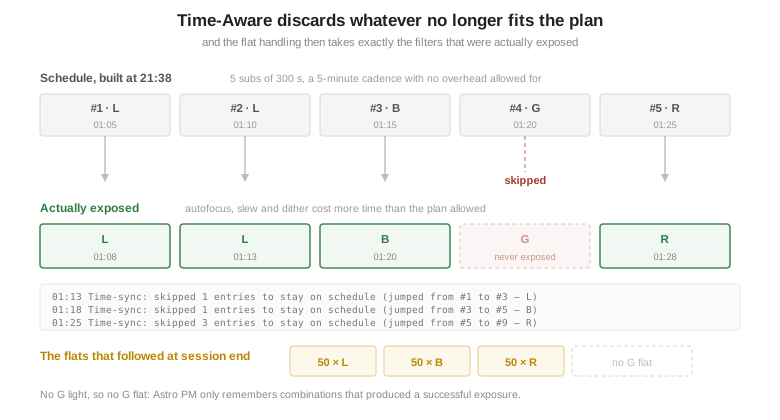
The lag grew over the night, and it appears in the log three times:
01:13  Time-sync: skipped 1 entries to stay on schedule (jumped from #1 to #3 — L)
01:18  Time-sync: skipped 1 entries to stay on schedule (jumped from #3 to #5 — B)
01:25  Time-sync: skipped 3 entries to stay on schedule (jumped from #5 to #9 — R)
The first two jumps passed over dither entries only, after which the next exposure ran normally. The third skipped three entries at once – and the green sub was among them.
The schedule had assumed a five-minute cadence, that is, the bare exposure time. Reality needed more: 45 seconds of slew, 22 seconds to start guiding, three autofocus runs of roughly two minutes each, plus dithering and saving. The log parser works it out itself at the end:
overhead categories: CameraTemp:1(436s), Autofocus:3(365s), Wait:1(330s),
  ImageSave:154(142s), FlatPanel:13(44s), CameraDownload:150(36s),
  MountOps:3(4s), PlateSolve:3(3s), Guiding:2(0s)
Six minutes of autofocus against 20 minutes of exposure. In playback mode Time-Aware that means: the sequence jumps to the entry that would be due by the clock, and whatever lies in between falls away. The green sub was the casualty.
This is not a bug, it is the documented mode of operation. But with five exposures planned it costs twenty per cent, and that qualifies what I said in the last article, namely that Time-Aware is the right choice for a remote rig. For long nights I stand by it. For short blocks where every frame counts, Sequential is the better answer – it simply runs late instead.
The second lever is autofocus. I had triggered it both after every filter change and on a 2 °C temperature change. All three runs that night came from the filter-change trigger – with LRGB and well-kept filter offsets that one is dispensable, and it ate six of the 28 minutes.
What did work is the other half of the story. For every successful light Astro PM wrote a line:
AstroPM | Flats: recorded combo M33 L G150 O50 1×1 @ PA 0.0° (no rotator)
Three combinations – L, B, R. No green. And at the end of the session exactly three sets of flats were taken. No G flat for a G light that does not exist. That is precisely what the mechanism is built for, and on a night when the schedule did not hold, it proved itself for the first time.
Finding 3: the flat-darks failed completely
System.NullReferenceException: Object reference not set to an instance of an object.
   at NINA.Sequencer.SequenceItem.FlatDevice.TrainedDarkFlatExposure.Execute(…)
      in /_/NINA.Sequencer/SequenceItem/FlatDevice/TrainedDarkFlatExposure.cs:line 219
The caveat from the last article, come true word for word. I wrote there that Astro PM writes filter, gain, offset and binning only into the Trained Flat Exposure – and that the Trained Dark Exposure in After Flats sits outside that loop. The log confirms it three times, once per filter:
AstroPM | Flats: Trained Flat Exposure set to LUMINOS G150 O50 1×1
AstroPM | Flats: Trained Flat Exposure set to BLUE G150 O50 1×1
AstroPM | Flats: Trained Flat Exposure set to RED G150 O50 1×1
For the dark instruction: not a single line. It sits in After Flats, outside the loop, and therefore stays exactly as I inserted it.
The log does not say why it then crashes. The mechanism is clear enough, though: both trained instructions look up their exposure time in the table above, and the key for that is the filter. My dark instruction had none assigned. No filter, no entry; no entry, no return value – and out of that comes a NullReferenceException.
The fix is correspondingly small: set a filter in the Trained Dark Exposure. One, not seven. A flat-dark is taken in the dark; which filter happens to be in the wheel is physically meaningless. It serves only as the key for the time – and on my rig that is the same for every filter, because I settled on Dynamic Brightness in the Flat Wizard. The table says 3.00 s seven times over, and the log confirms it: all 150 flats ran at exactly three seconds; only the panel brightness differed.
Update, 13 August 2026: This explanation is wrong. On the following night Astro PM filled in the Trained Dark Flat Exposure itself as well – with filter, gain, offset and binning, exactly as it does the flat instruction. So the missing filter was not the cause. The position is the likelier culprit: here the dark instruction sat in After Flats, outside the loop that runs per combination. What happened on the second night →
What saved the rest of the night was a setting I had never given any thought to: ContinueOnError. The instruction failed, the sequence carried on – warm the camera, Find Home, disconnect. The cover was already shut at that point, which is what “keep closed” had taken care of. Without ContinueOnError the cooling would have kept running and the mount would not have gone home.
How far off the flats are because of the gain error is something I worked out on a single frame – together with noise, illumination, dust and the question of the PWM banding. That will be an article of its own; it would take us too far here.
What I am changing
All told they are three very different things: a mistyped number, a documented mode of operation I had underestimated, and an empty dropdown. Not one hardware fault, no aborted sequence.
The real lesson is in the first finding. Not that the automation failed – but that it passed a configuration error on, quietly and with complete consistency, right down into every single file. One field in a form, and the gain of every frame that night is a different one from the gain all my documentation assumes.
For a first unattended run across 8,500 kilometres that is still a good outcome. Above all because the part I trusted least worked flawlessly: at the end of the night the rig calibrated itself, and with exactly the filters it had used.
I did the analysis of the log and the flats, as has become my habit, together with Claude AI.
Sources
Astro PM – Playback Modes · Automated Flat Handling
N.I.N.A. – Advanced Sequencer instructions – what Trained Flat Exposure and Trained Dark Exposure handle by themselves
N.I.N.A. log of the night: 20260811-141239-3.2.0.9001.21312-202608.log
🔭 How the sequence is built: My start with Astro PM → · The flat panel behind it: A lid that lights up · The rig itself: My rig @ Starfront in Texas