 Svenesis.org
Svenesis ImageMono Train
Version 1.7.20 – GPL-3.0-or-later
🚧 Current version 1.7.20. Not yet in the official Siril Script Repository – download directly from GitHub.
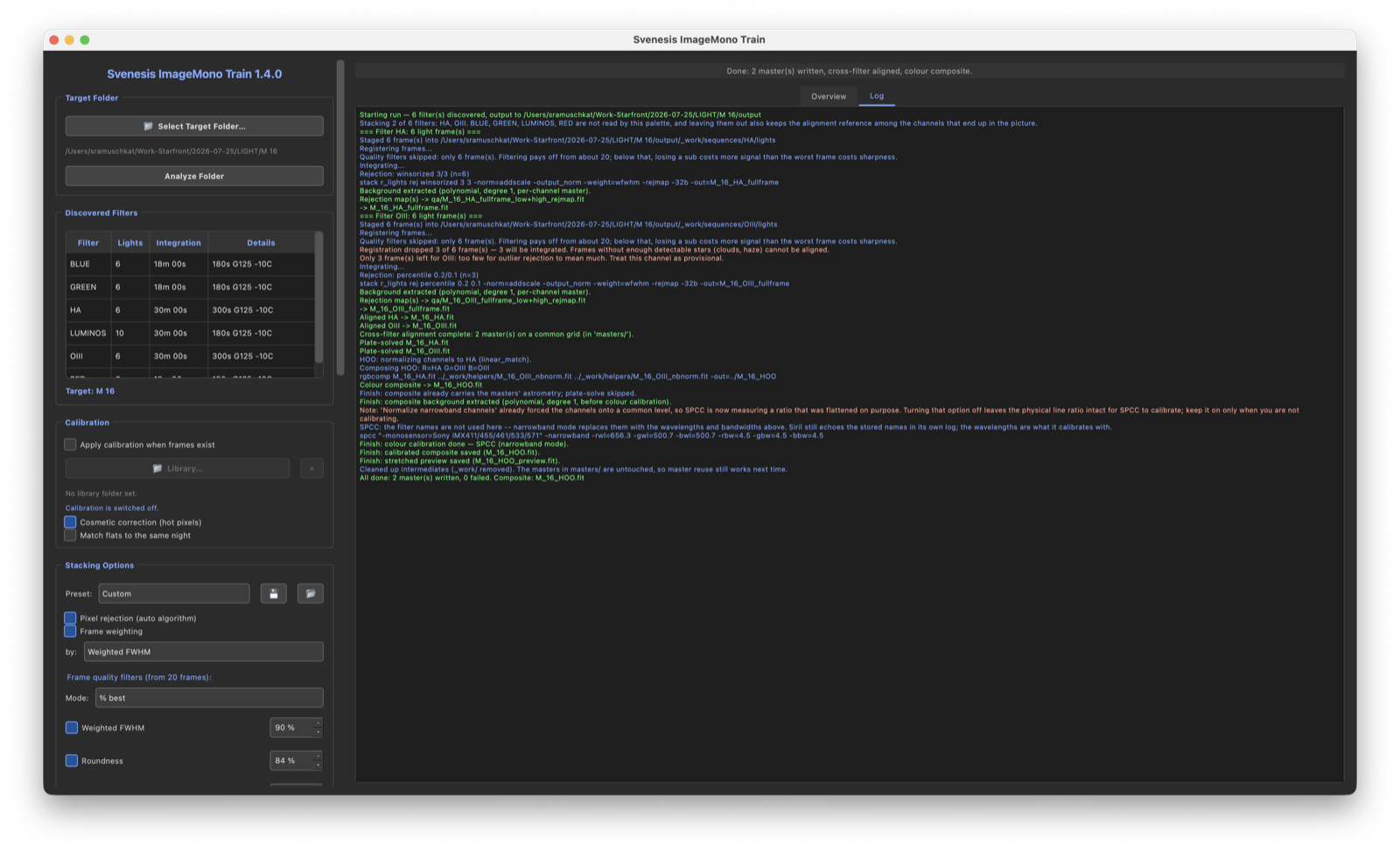
ImageMono Train turns a night with a mono camera and filter wheel into a finished colour image. You pick the folder with the frames; the script does the rest in Siril: calibrating, stacking, aligning, combining the colour and calibrating it. You never need to type a Siril command.
📖 The story behind it, and what I learned about mono processing along the way: Seven Filters, One Button →
How a run works
- Find the frames. The script reads the FITS headers of every file in the folder and sorts the lights by filter. Several nights of one target are pooled, and compressed
.fzfiles are read directly. - Calibrate. Flats, darks and bias are matched automatically when present. If they are missing, the run carries on without them and says so.
- Stack, per filter. How outliers are rejected depends on how many frames actually remain.
- Align the channels. All masters go onto the same pixel grid, so the colour image shows no colour fringes.
- Combine and calibrate the colour. With spectrophotometric colour calibration (SPCC), matched to your sensor and filters.
Who is it for?
For mono cameras with a filter wheel. Frames are never debayered, so the script is not meant for colour (OSC) cameras.
Palettes
- LRGB and RGB – natural colour, with or without luminance
- HaRGB – RGB with Hα in the red channel
- SHO, HOO and seven further narrowband mappings
- Realistic1 and Realistic2 – weighted blends
With Auto the script suggests a palette that fits the filters it found. The channel mapping can be changed by hand.
What the script looks out for
- Outliers by the real frame count. Few frames get a simple method, many get a more elaborate one – from percentile clipping to linear fit. If clouds leave only half the frames, the choice follows. The thresholds come from Cyril Richard’s AMSP script.
- Darks must really match. Camera, gain, binning and image size exactly, temperature within ±2 °C. For exposure, a shorter dark may be 5 per cent off, a longer one only 2 per cent: too long a dark subtracts too much and wipes out faint signal.
- Masters are reused only while they still fit. Add new flats and the script rebuilds the master instead of quietly using the old one.
- Only the palette’s filters. On request the script stacks only what goes into the image. That can matter a lot: in an M 16 night, OIII found just 12 star pairs for alignment alongside all the broadband channels, and 1,165 with Hα alone.
- The sensor name is checked. A wrong name is no error to Siril – it quietly uses a different one. The IMX533, for example, is listed there only as the colour version; a mono rig would otherwise be calibrated as a colour camera.
- The image stays linear. No green removal (SCNR) on the result, because in SHO it clips real Hα signal. The Hα blend in HaRGB is a plain weighted sum. Stretching and finishing stay with you.
Background extraction: careful with RBF
Siril offers two models: a simple polynomial and the more flexible RBF. On nebulae that fill the whole frame, RBF removes much of the nebula along with the gradient – in a test only 17.8 per cent was left, against 99.9 per cent with the simple polynomial. On small objects in a wide field RBF is the better choice. The script cannot tell the two apart, so it warns on narrowband and leaves the decision to you.
What you get
Everything lands in the Stacked/ folder – in the chosen folder or up to three levels above it, so for an Astro PM project right beside Originals.
masters/– one master per filter; a different palette is mixed again in seconds without restacking- the colour image, linear
output.md– what really happened in the run, including skipped filters and rejected framestodo.md– the next steps in Siril, with menu pathscommands.ssf– every Siril command of the run, for reference
View sample report View sample guide
Requirements
Siril 1.4 or newer with Python support. The script installs the Python packages (sirilpy, PyQt6, astropy, numpy) itself on first start. Colour calibration needs an internet connection or a local Gaia catalogue; without either, the colour image is still produced, just uncalibrated.
⚠️ Don’t work inside cloud folders. Dropbox, OneDrive, iCloud Drive or Google Drive can rewrite files mid-run. Best work on a local disk, or at least exclude Stacked/_work/ from syncing.