 Svenesis.org
July 27, 2026 · 🔭 Astronomy
Dew on the telescope – what the dew point really means and when I have to act
Of all the things that can ruin a remote night, dew is the most insidious. No dramatic failure, no alarm – the stars simply go soft, mushy, blurred over the course of half an hour, and by the time you notice, the front element has long since fogged over.
With a telescope standing 8,500 kilometres away, I can't just walk out and wipe the optics dry. So I had to understand when dew threatens and how to prevent it before it happens. This post is what I learned doing that – with real numbers from my own rig.
Where the telescope stands – and why dew is a constant there
My rig sits at Starfront Observatories in Texas, in rural central Texas near Rockwood/Brady, and I run it from Germany – some 8,500 kilometres as the crow flies. The site has a beautifully dark sky, but climatically it is no desert.
Central Texas lies in the humid subtropical zone; the summers are hot and muggy. Humidity is a constant there for a large part of the year: the muggy phase runs from late April to mid-October, peaking in July – on the long-term average, more than 17 days a month are muggy or worse, because moist air is drawn in from the Gulf of Mexico and dew points regularly climb past about 18 °C. Winter is considerably drier.
Put differently: for more than half the year, clear, windless nights there are almost inevitably dew-prone – the sky radiates away, the air brings Gulf moisture with it, and the optics sit right in the middle.
And I can't sidestep it: a remote rig runs all year round, so I image during exactly those months too. Which is why dew here isn't a side issue but routine.
The three numbers that belong together
Almost every weather station shows three values: temperature, humidity and dew point. The third is the important one, and the most commonly misunderstood.
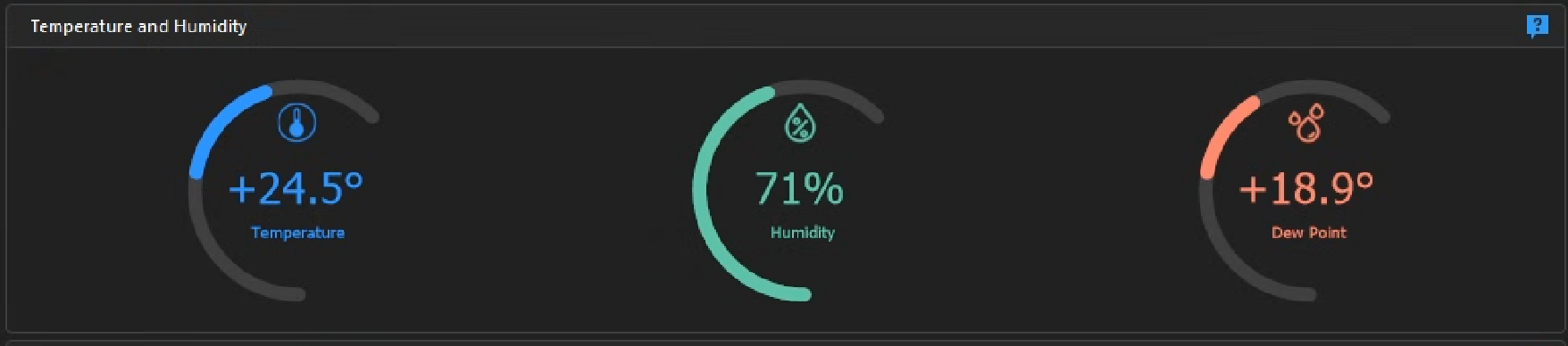
The dew point is the temperature to which you would have to cool the air for the water vapour it holds to start condensing. Air can carry only a limited amount of water, and that limit drops with temperature. Once the air – or a surface – cools to the dew point, that's it: water comes out.
An example from one of my nights: air 24.5 °C, humidity 71 %, dew point 18.9 °C. In concrete terms: any surface that cools to 18.9 °C or below gets wet.
The number that actually matters: the spread
The figure I really work with isn't the dew point alone but the gap between air temperature and dew point – the spread. It is the buffer before anything fogs up.
In the example above: 24.5 − 18.9 = 5.6 K of spread. As a rough rule of thumb:
- Above 5 K: relaxed. Heater on low as insurance.
- 2 to 5 K: dew on unheated surfaces likely – dew heater needed.
- Below 2 K: condensation is imminent, heating power up. (Below 0 °C dew point, dew becomes frost.)
And if you ever want to estimate the dew point without reading it off – from about 50 % humidity upwards this rule of thumb fits surprisingly well:
dew point ≈ temperature − (100 − humidity) / 5
For my example: 24.5 − (100 − 71)/5 = 18.7 °C. The display said 18.9 °C. Close enough.
Why the optics fog up sooner than the spread promises
Now comes the part that surprised me at first. At 5.6 K of spread you would feel safe. You aren't – and the reason is physics that has nothing to do with air temperature.
At night your telescope's front element "sees" cold space and radiates heat towards it. That cools the glass below the surrounding air temperature. How far depends on the night: after a couple of hours under a clear sky, one to two kelvin is usual; in still air under very dry, very clear skies it becomes several. So the air can still be at a comfortable 25 °C while your optics are already sinking towards the dew point.
It is the same effect that dews up a car roof in the morning while the road beside it stays dry: whatever has a clear view of the sky cools more than its surroundings.
What that means is shown by the next graphic, using the 01:20 measurement from the table further down – 6.3 K of spread in the air:
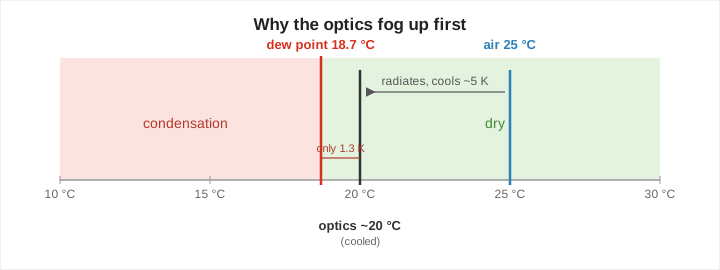
That is the real lesson: judge the risk by the gap between the optics and the dew point, not by humidity alone. And since you usually don't measure the glass temperature directly, in practice this means: with a small spread and a clear sky, start heating in good time.
How a night develops
The tricky part is that the situation gets worse over the night even though "nothing changes" in the weather. In the textbook case it goes like this: the absolute amount of moisture in the air stays constant, so the dew point does too, while the temperature falls after midnight. Relative humidity rises as a result, and the spread shrinks.
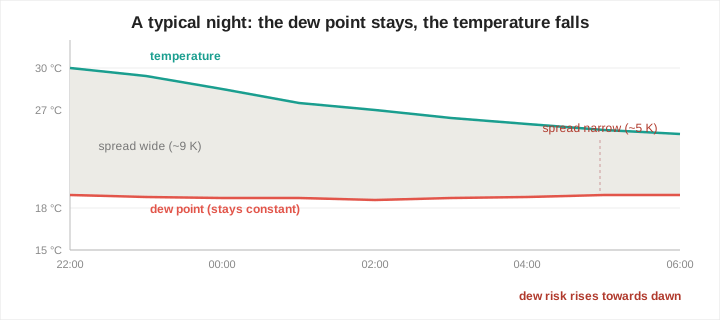
So much for the theory. On the night I'm describing here it went differently – and more instructively. This is the trace from the observatory's weather station, from just after three until six in the morning:
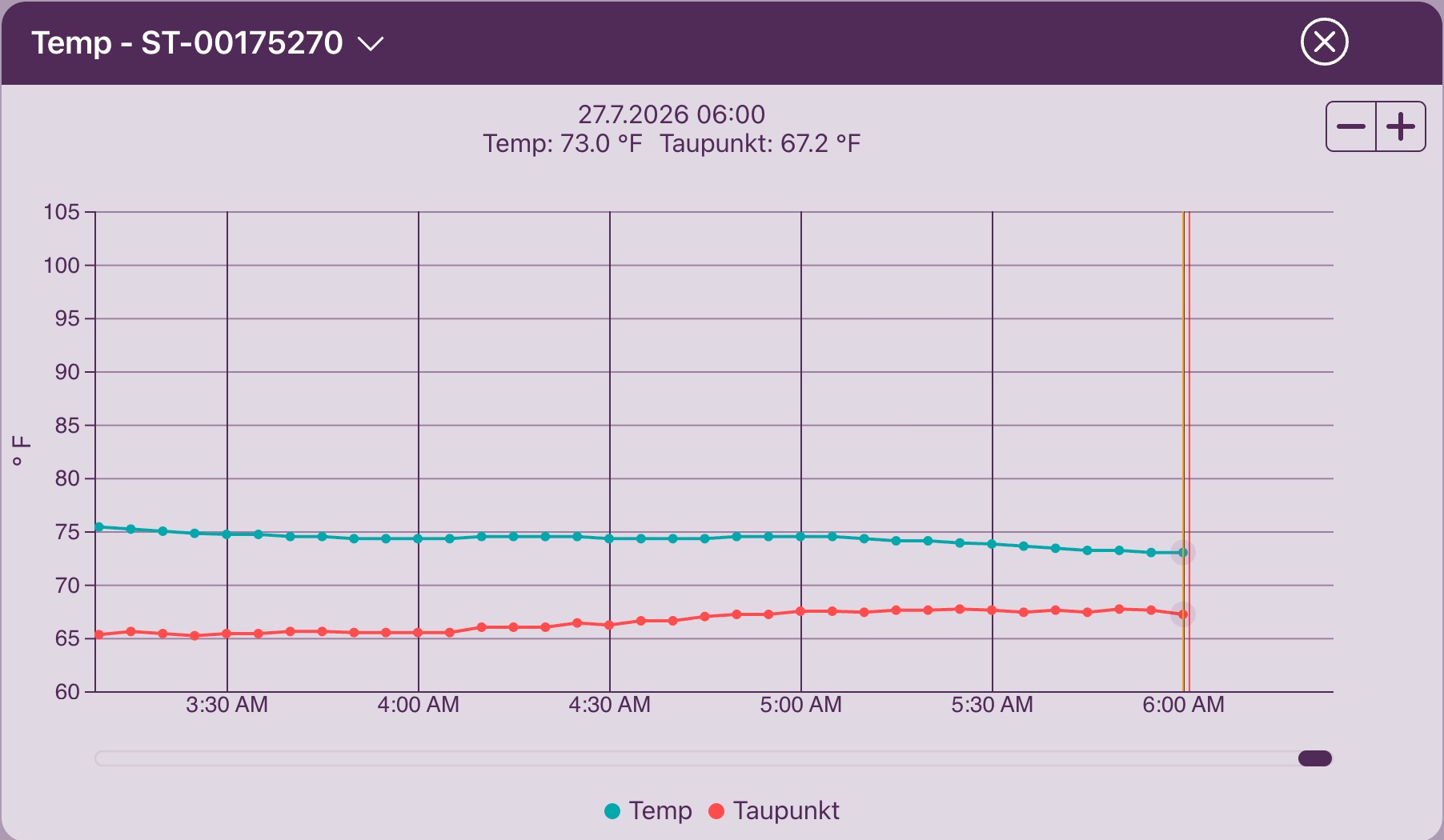
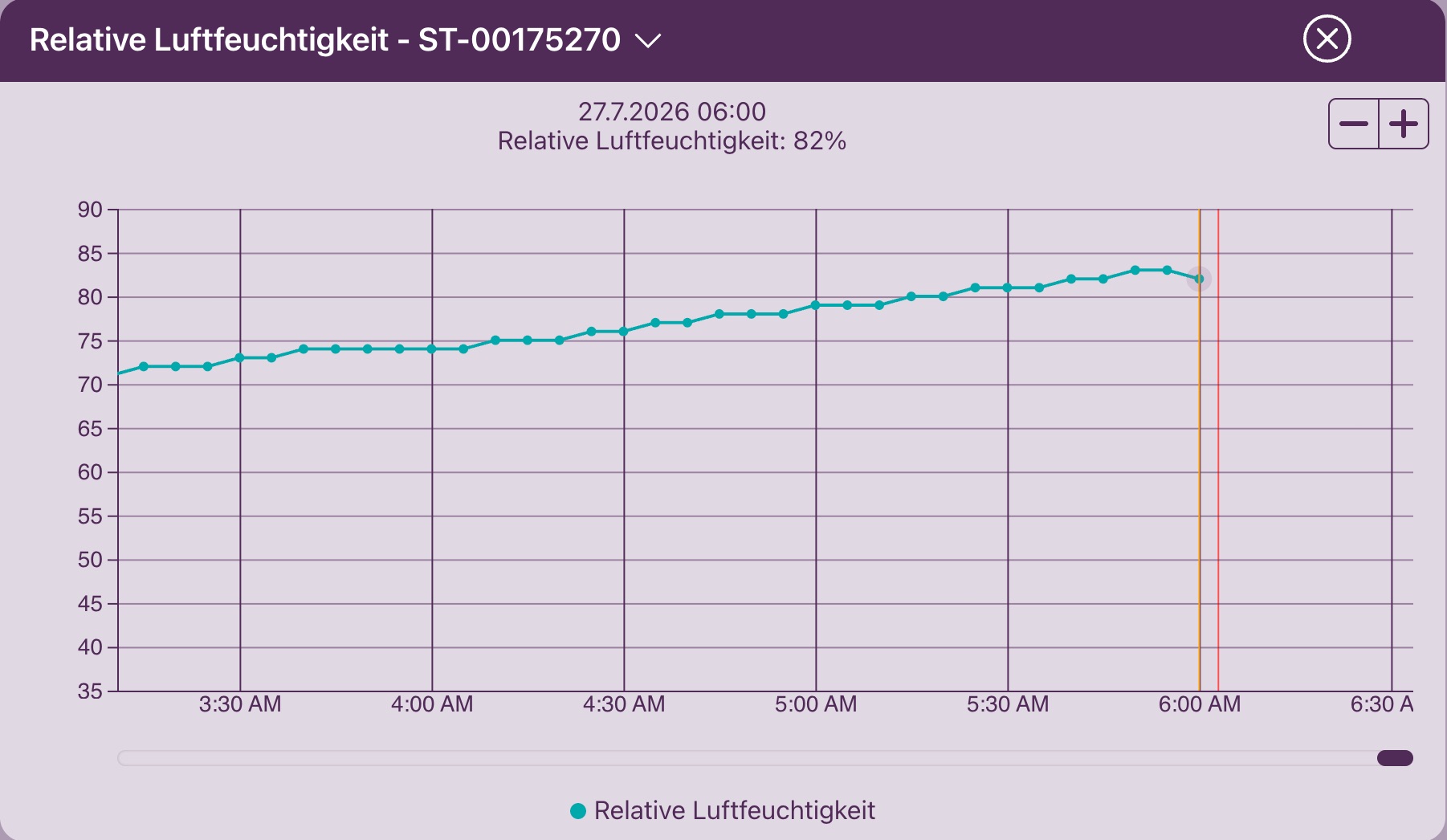
In concrete terms, this is what the spread did – all values from the PowerBox humidity sensor, which sits on the pier right next to the optics:
| Local time | Temperature | Dew point | Spread |
|---|---|---|---|
| 23:15 | 27.4 °C | 18.9 °C | 8.5 K |
| 01:20 | 25.0 °C | 18.7 °C | ~6.3 K |
| 03:42 | 22.9 °C | 19.1 °C | 3.8 K |
| 04:33 | 22.8 °C | 19.8 °C | 3.0 K |
| 04:45 | 22.9 °C | 20.4 °C | 2.5 K |
| 05:02 | 22.9 °C | 20.6 °C | 2.3 K |
| 05:19 | 22.7 °C | 20.8 °C | 1.9 K |
| 05:34 | 22.5 °C | 20.8 °C | 1.7 K |
| 05:53 | 22.1 °C | 21.1 °C | 1.0 K |
| 06:04 | 22.3 °C | 21.1 °C | 1.2 K |
From a comfortable 8.5 K in the evening down to 1.0 K at the low point – an eighth of the buffer left.
The interesting part is how it disappeared. Between 03:42 and 05:19 the temperature stood essentially still: 22.9 °C at the start, 22.7 °C an hour and a half later. The dew point, meanwhile, climbed from 19.1 to 20.8 °C, by 1.7 kelvin. The buffer halved in that time almost entirely because the air got damper – not because it got colder.
After that the picture turned round once more: until 05:34 the dew point held at 20.8 °C while the temperature fell again. And in the step to 05:53 both acted together – the temperature gave up 0.4 K, the dew point gained 0.3 K. At 1.0 K of spread and 94 % humidity this was no longer a warning zone but the real thing.
And then, at 06:04, the first easing:
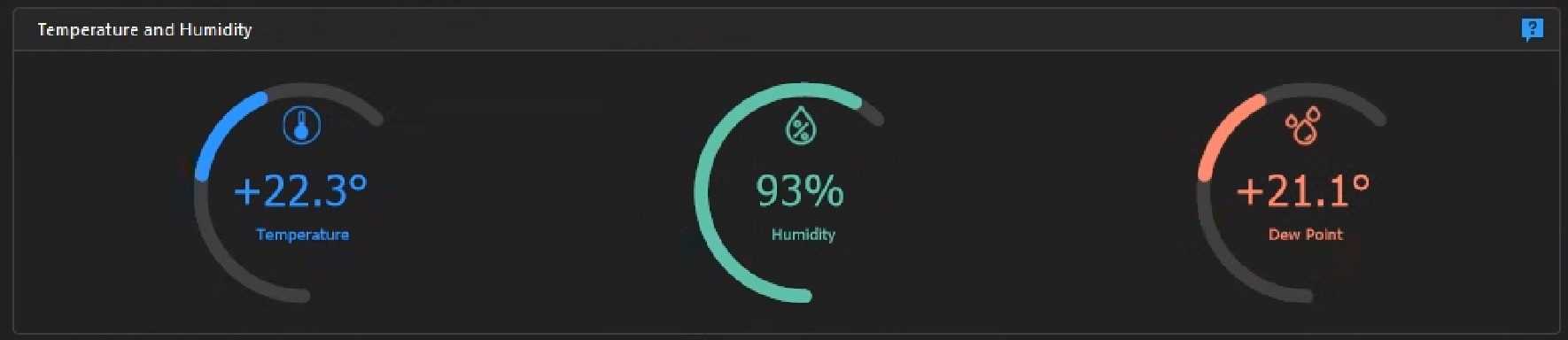
Over the night, then, the two drivers took turns and at times added up: first the falling temperature, then the rising moisture, then both, and at the end the rising sun. The spread moved the same way every time, until it finally recovered on its own.
Which is exactly why the spread is the number you watch – and not either of its two parts. Which mechanism happens to be working is irrelevant to the optics.
One more detail visible when you compare the two sources: at 06:00 the station reports a dew point of 67.2 °F, that is 19.6 °C – while the PowerBox sensor shows 21.1 °C at the same time. A kelvin and a half apart, and the gap widened over the night. No contradiction: the enclosed sensor sits on the pier amid the equipment, the station stands in the open. Both show the same trend – the sensor at the optics simply reads damper, and for heater control that is the safe direction. It errs early rather than late.
Two data sources, two jobs
One point that saved me time: don't confuse the forecast with the measurements on site.
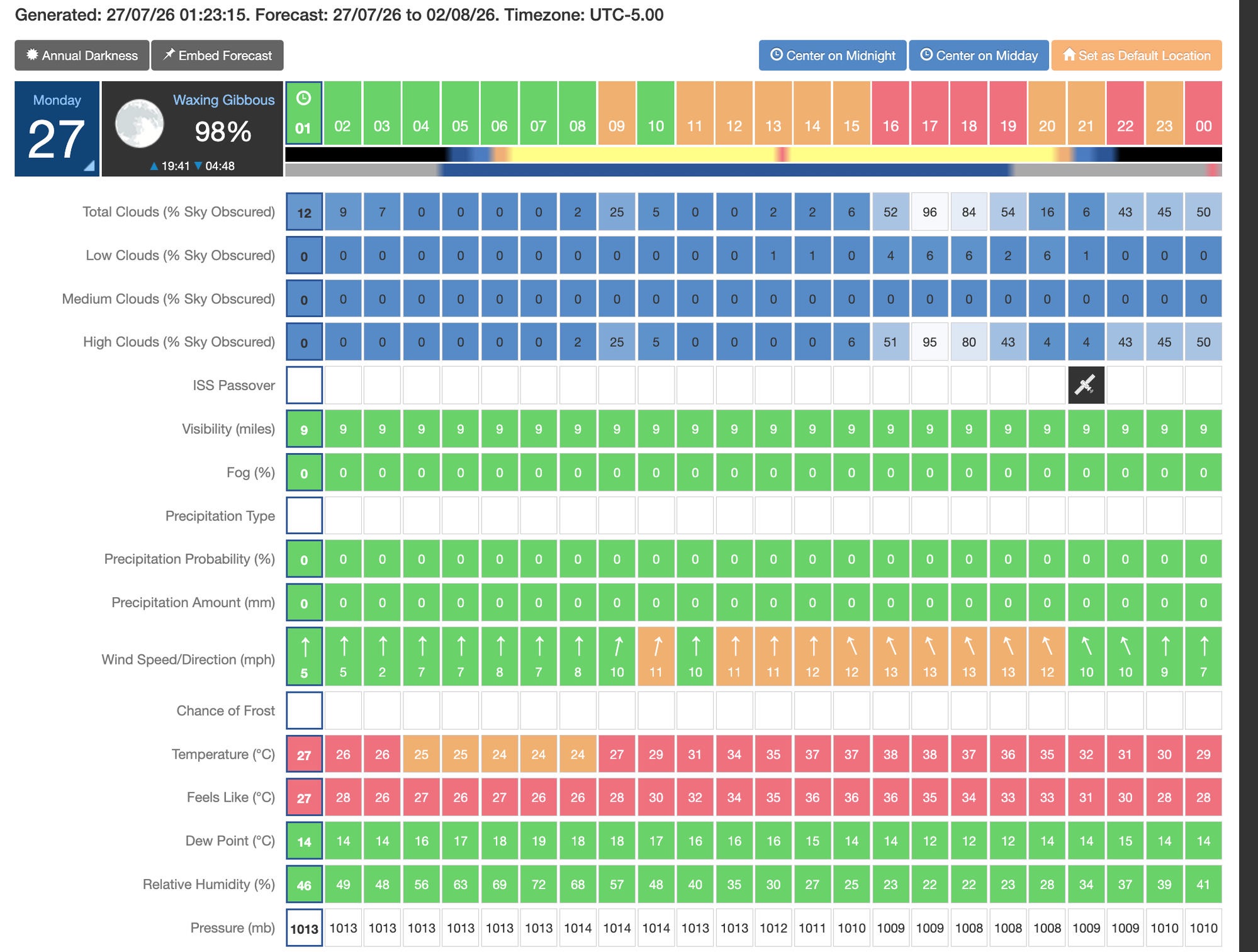
I use the forecast to decide whether the night is worth it at all: cloud, wind, fog, chance of rain. For the real-time dew decision it is too coarse – on my night the forecast humidity was well below what the station actually measured (forecast 46 %, 68 % at the sensor) – and for the dew point it was 14 °C from the model against 18.7 °C in the measurement. That is nearly five kelvin of difference in exactly the number the heating decision hangs on. For the heater, the measurement on site counts, not the model. Over the course of the night the two did at least move closer.
A neat extra check if your station provides it: the sky temperature. If under clear weather the sky is markedly colder than the air – roughly 25 to 40 K, depending on sensor and threshold – your optics are radiating strongly; dew alert. If the gap is small, there is cloud overhead – that slows the radiation and actually lowers the dew risk.
How I respond: the dew heater
The remedy is unspectacular and effective: a dew strap that keeps the glass a few degrees above the dew point so that it never condenses in the first place. In my case a Pegasus PowerBox with two heater channels handles it.
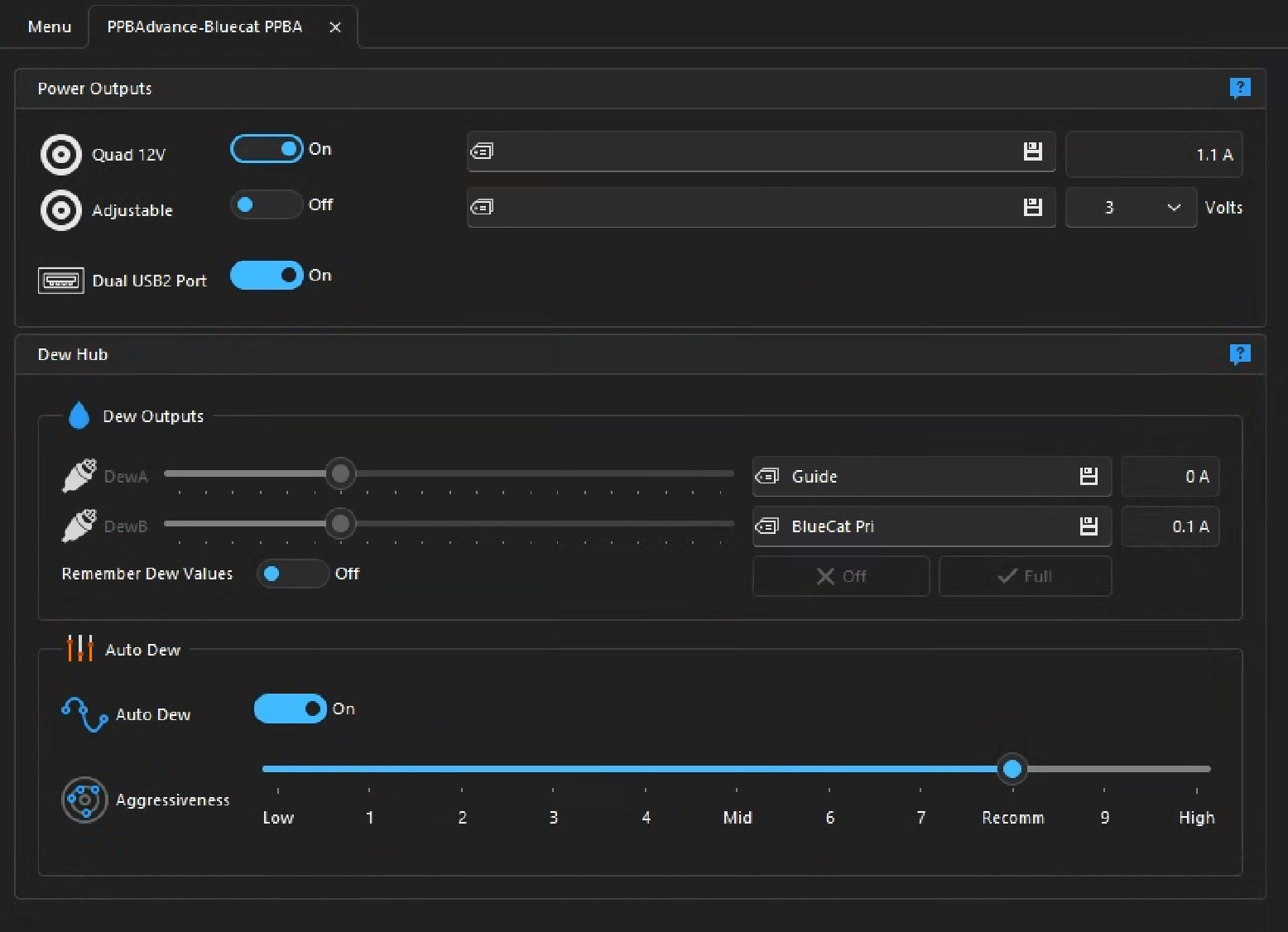
My settings and why:
- Auto Dew: on. The automation turns the heating up by itself when the spread shrinks – it draws on the sensor's dew point and the current the straps are pulling, and retunes the power every ten seconds. Exactly what you want in the small hours.
- Both optics on their own channels – main telescope and guide scope. The guide scope is easily forgotten; if it dews over you lose the guide star and with it the tracking. The guider channel matters as much as the main one.
- Aggressiveness on "Recomm" – the manufacturer's default, step 8 on the scale from 0 to 10. I leave it there and deliberately don't go higher: my humidity sensor sits enclosed on the pier and systematically reads a few points high. At the top settings Auto Dew would therefore overheat – and overheating isn't harmless: it puts thermal gradients into the tube that degrade seeing and let the focus drift. Precisely what you otherwise work hard to reduce.
And how I check that the heater really heats
A heater you believe is connected but which isn't heating is more dangerous than none at all – it lulls you into safety. The reliable test goes through the channel's current reading: a strap that heats draws current. If the channel sits permanently at 0 A when it should be heating, something is wrong.
My function test, done once in peace instead of hoped for in an emergency:
- Switch Auto Dew off briefly.
- Drag the channel slider to "Full" by hand.
- Watch the current reading – it must jump to a clear value above zero (a small guide-scope strap draws roughly 0.2 to 0.5 A). That proves channel and strap are alive.
- Set it back, Auto Dew on again.
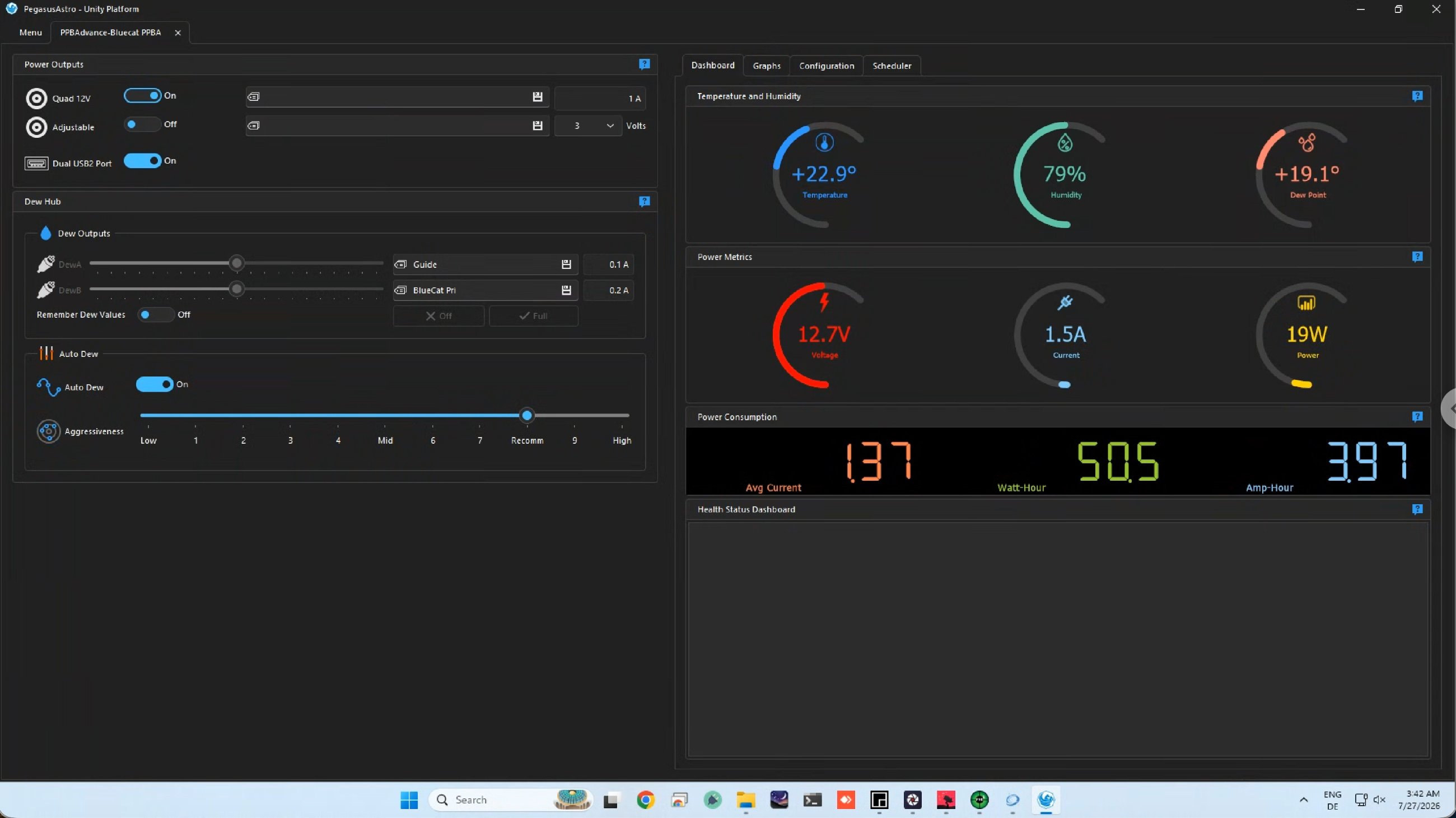
On the night described above I didn't even have to test manually: when the spread had fallen to 3.8 K around 03:42, Auto Dew had turned itself up – the guide-scope channel drew 0.1 A, the main telescope 0.2 A. That is below the values from the full-power test above, and rightly so: Auto Dew doesn't heat flat out, it heats as much as needed. What matters isn't how high the current is but that it is above zero. Two currents above zero, both optics being heated. That is exactly how it should look.
That was at 03:42, at 3.8 K. As the table further up shows, it got considerably tighter afterwards – down to 1.0 K. So the automation had plenty left to do that night.
And how did the night end?
The last frame of that session was taken at 04:51 – Sh2-129 in OIII. The night was a continuation: the whole point was to gather more OIII data than the night before. Of all channels the one that needs the most exposure time – every hour dew costs you, it costs the most there.
At the moment of that last frame the spread sat between the 04:45 and 05:02 readings, so around 2.4 K.
There was no dew on the telescope. The optics stayed dry even though the buffer in the air had shrunk to a good quarter of its evening value – and even though the front element, through its own radiation, was sitting below that, probably already under the dew point.
That is the whole point of the exercise. Without a heater it would have ended right there: not with an error message, but with stars going a little softer from frame to frame until nothing can be salvaged. With a heater it is a night like any other – just with a few tenths of an amp more on the electricity bill.
So when do I have to act?
In summary, as a small decision aid for the night:
- Spread above 5 K, heater running, stars round: do nothing, keep collecting.
- Spread falling towards 2 to 3 K (typically towards morning): check that Auto Dew is turning up and both channels are drawing current – the guide scope in particular.
- Stars going soft, HFR rising, guide-star SNR falling: the optics are already fogging. Heating power up; if it doesn't improve quickly, the night is probably lost on that optic.
- Sky clouding over: dew risk drops (less radiation) – but then the weather is the problem anyway.
The nice thing about dew is that it is the one "failure" you can prevent completely with a bit of physics and a heater strap. You just have to keep an eye on the right number – not humidity, but the gap between the optics and the dew point – and start heating before a shrinking spread turns into a fogged objective.
🔭 More about the rig: My Rig @ Starfront in Texas · What became of the Sh2-129 data: A Sunday with Somebody Else's Siril Code → · A failure only the log revealed: The Forgotten Meridian Flip →