 Svenesis.org
Svenesis CosmicDepth 3D
Version 1.0.1 – GPL-3.0-or-later
✨ Available in the official Siril Script Repository. You can install and launch this script directly from Siril – open Scripts → Get Scripts, search for Svenesis, and tick the checkbox next to this script.
Renders catalogued objects from plate-solved images as an interactive 3D scene. Objects are positioned at their actual astronomical distances behind an image plane, with “push-pin depth sticks” connecting each marker to its exact pixel location. This lets you perceive depth relationships – for example, distinguishing a nearby nebula at 1,344 light-years from a distant galaxy 30 million light-years away.
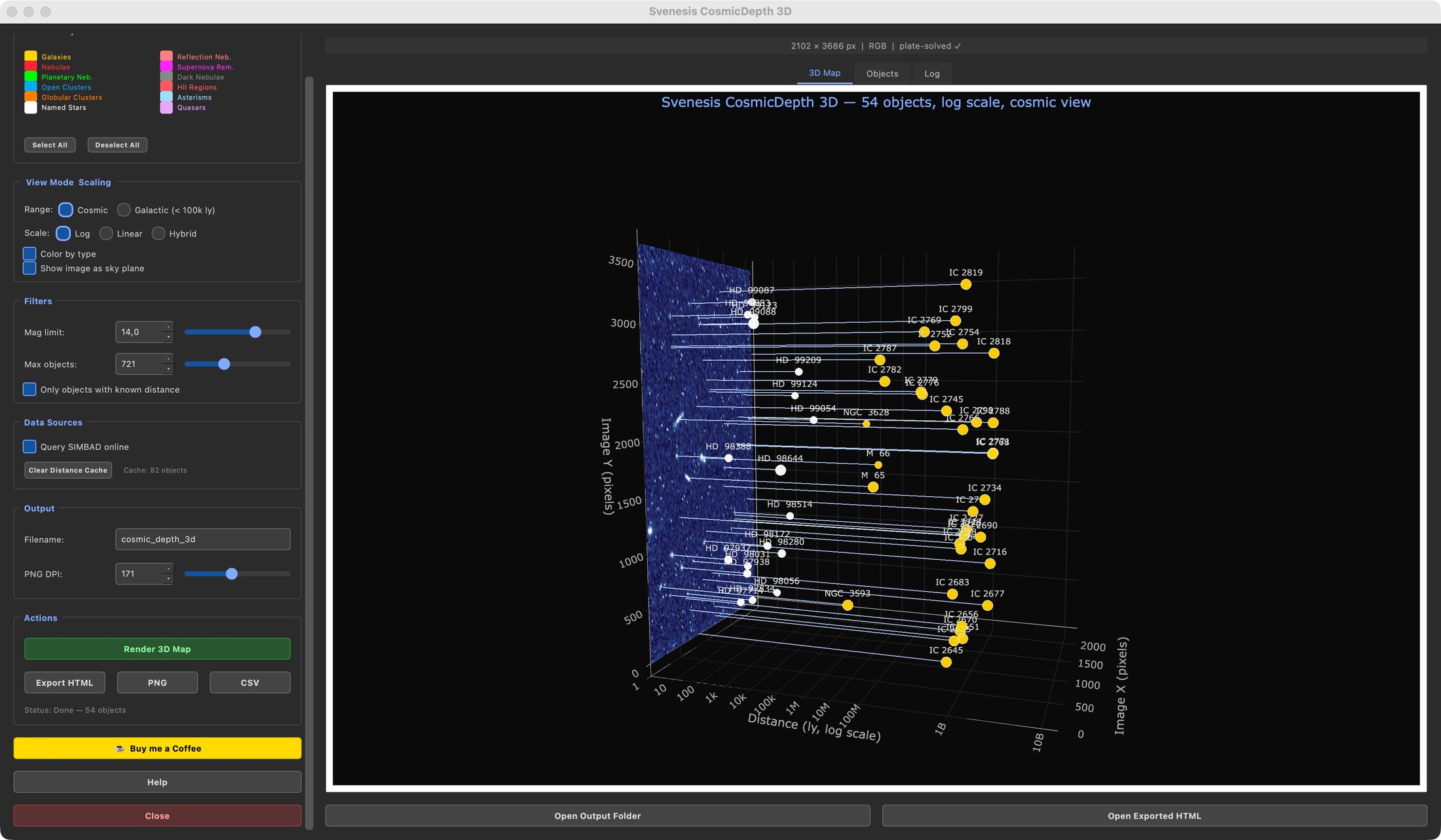
CosmicDepth 3D answers "how far apart are the objects in my image from each other?" – it keeps your photo as the backdrop and extends depth sticks behind it to show the true distances between annotated objects within that single field of view.
CosmicView 3D answers "where does my image sit in the galaxy or universe?" – it discards the image plane as a backdrop and instead places your photo as a textured tile inside a full 3D model of the Milky Way or Local Group, so you can see which spiral arm it points into and how far from Earth it reaches.
3D Scene Layout
- Image plane rendered as a flat rectangle matching the original orientation
- Depth sticks extending from markers down to the corresponding image pixels
- Rotatable embedded view via Plotly and QWebEngineView
- Viewer perspective with depth (X), pixel-X (Y), and pixel-Y (Z) axes
Scaling & View Modes
- Stretched-log (default) – piecewise-logarithmic distance axis
- Linear – true proportional distances
- Hybrid – linear up to 10,000 ly, logarithmic beyond
- View ranges – Cosmic (all distances) or Galactic (<100,000 ly)
Distance Resolution
Priority chain:
- Local JSON cache (90-day TTL)
- SIMBAD
mesDistancetable - Redshift × Hubble law calculation (z < 0.5)
- Type-based median fallback (clearly labeled)
Object Selection
Color-coded taxonomy matching Annotate Image: galaxies, emission and reflection nebulae, planetary nebulae, clusters, supernova remnants, dark nebulae, HII regions, named stars, asterisms, and quasars.
Performance
- Parallel SIMBAD tiling with up to 8 concurrent requests
- Cached Plotly JavaScript bundle (~3.5 MB)
- WebEngine repair dialog for ABI mismatches
- Live per-tile progress feedback
User Interface
- 3D Map tab – embedded rotatable Plotly scene
- Objects tab – sortable table with distance data
- Log tab – diagnostic output
- Help dialog – four informational tabs
- Dark-themed PyQt6 GUI
Export
- HTML – standalone interactive Plotly scene
- PNG – static export at the current camera angle via Plotly / kaleido
- CSV – full object table with coordinates, magnitudes, distances, and sources
Workflow
Load and plate-solve an image in Siril → launch the script from Processing → Scripts → select object types → configure magnitude limits, scaling mode, and view range → click Render 3D Map (or F5) → drag to rotate, scroll to zoom, hover for details → export as HTML, PNG, or CSV.
Dependencies
numpy, PyQt6, matplotlib, astropy, astroquery, plotly, kaleido; optional: PyQt6-WebEngine (in-app repair if missing)